
 Official WhatsApp API
Manage Every WhatsApp Conversation From One Shared Inbox
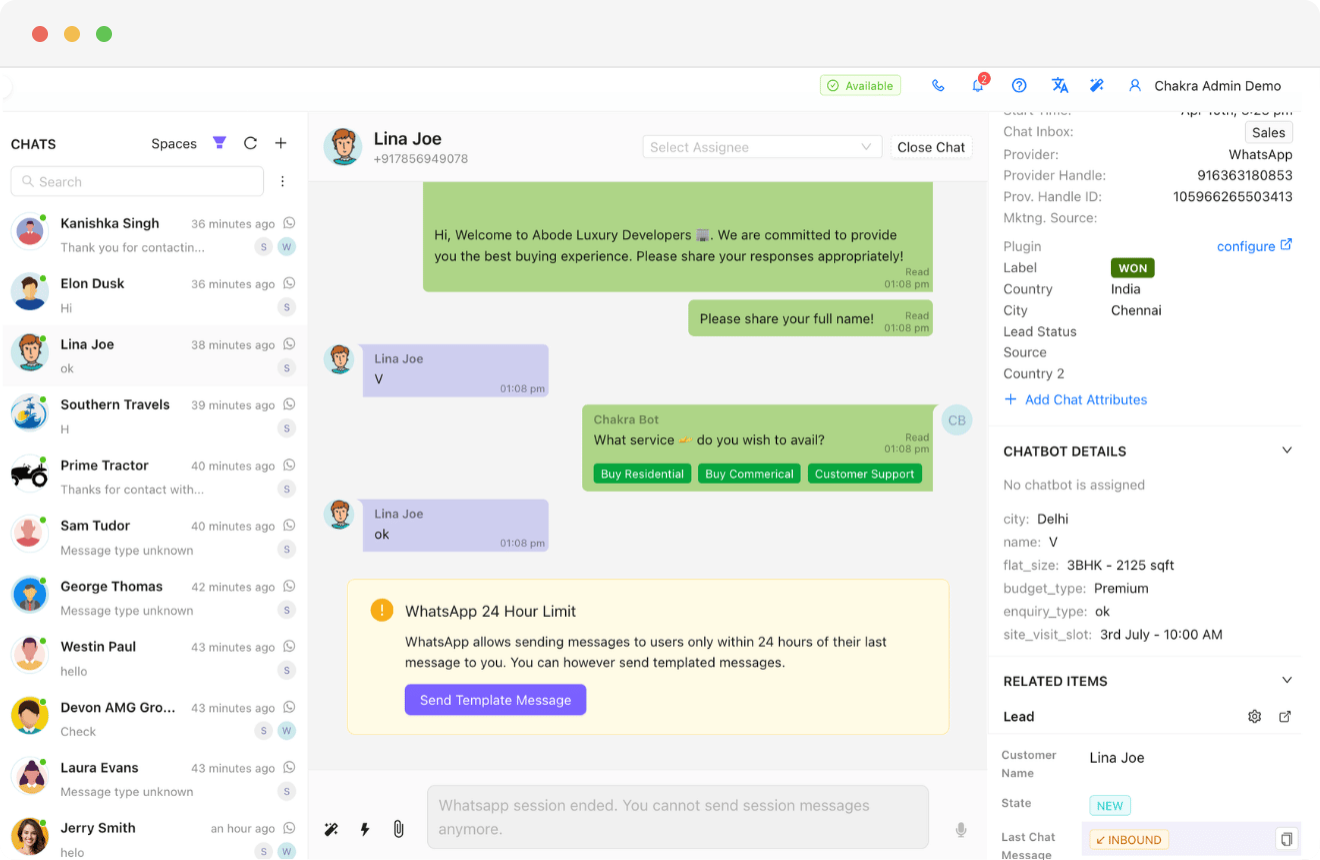
One inbox for your entire team. Every message routed, assigned, and visible in real time - with full customer context always one click away.
 No Credit Card Required
Built for scale. Proven across industries. Trusted by thousands.
Businesses love growing on WhatsApp with Chakra Chat
See why teams trust Chakra Chat for WhatsApp API, campaigns and support, in their own words.
- Rated on
4.8/ 5
Read reviews on G2 → - Rated on

4.3/ 5
Read reviews on Trustpilot →
Manage Every WhatsApp Conversation From One Shared Inbox
Stop losing conversations across personal devices and disconnected tools. Chakra's shared inbox brings every WhatsApp message into one collaborative workspace - with smart assignments, full customer context, and real-time visibility for your whole team.
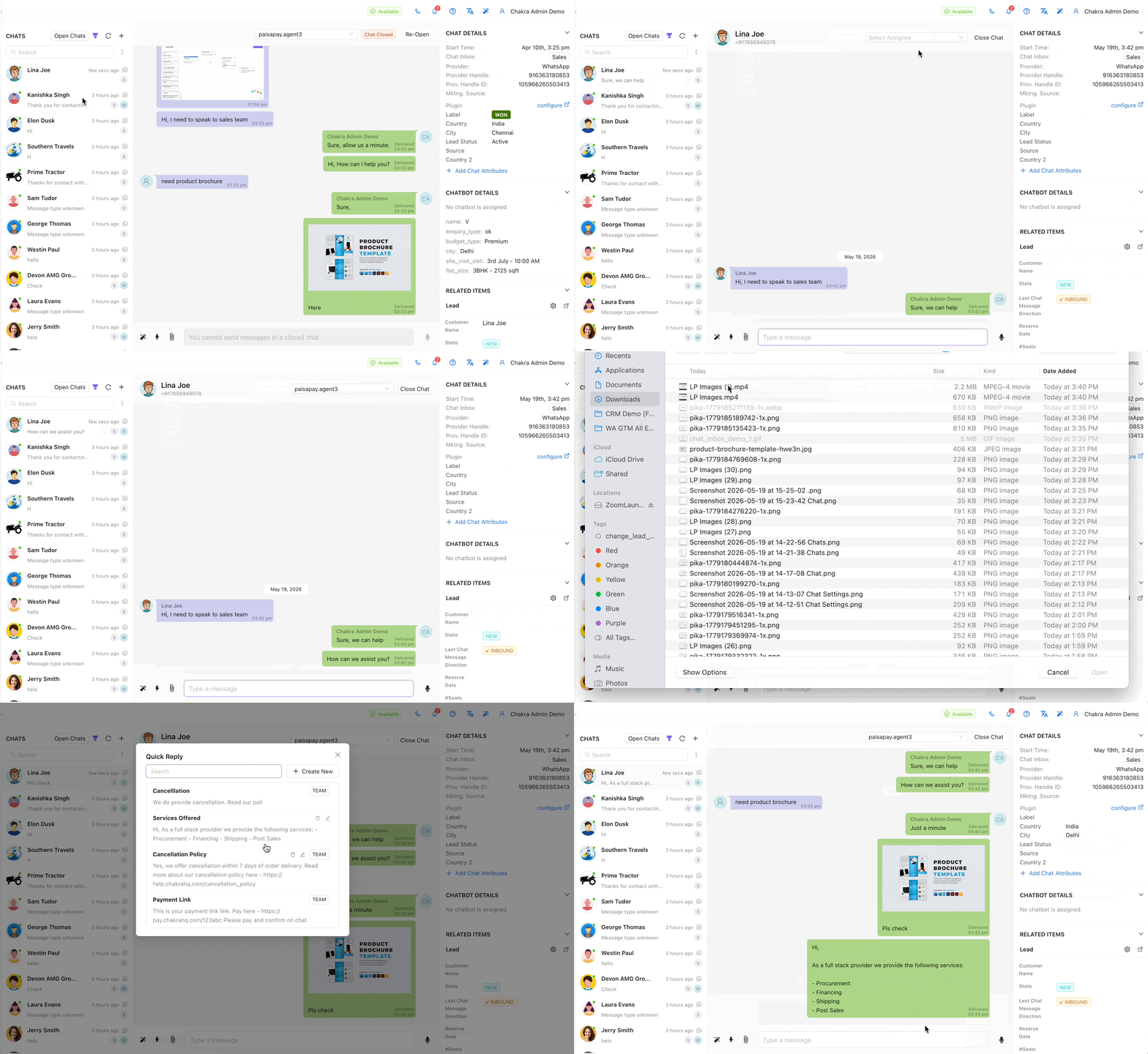
Unified Team Inbox
- Multi-Number Routing - Every incoming message across multiple WhatsApp numbers routes to a single, secure team inbox with real-time visibility.
- Rich Messaging - Send text, rich media, voice messages, and file attachments - or start fresh conversations using approved template messages.
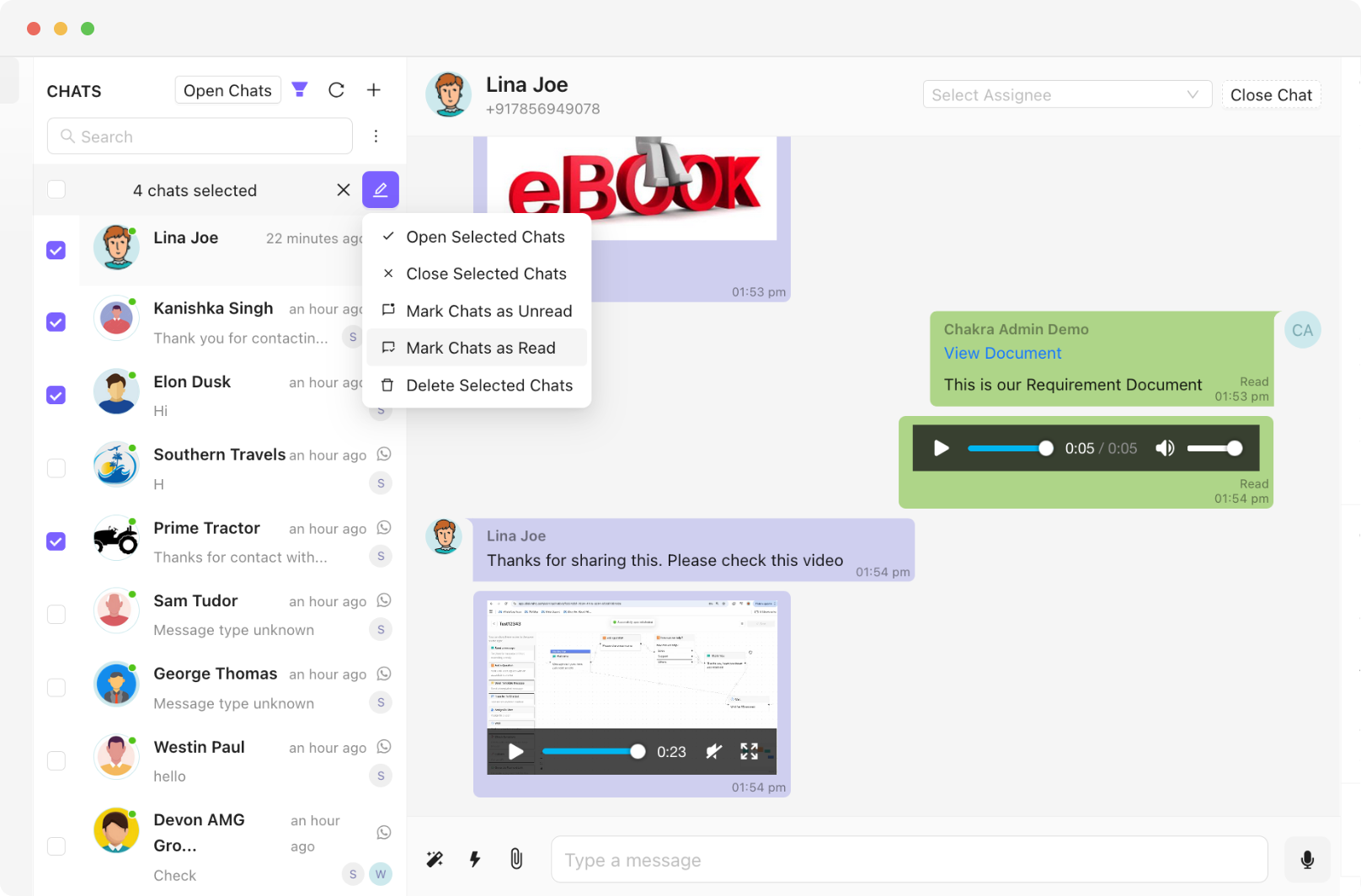
- Bulk Chat Actions - Mark chats as read, unread, open, or closed across multiple conversations in a single action.
Smart Assignment & Access Control
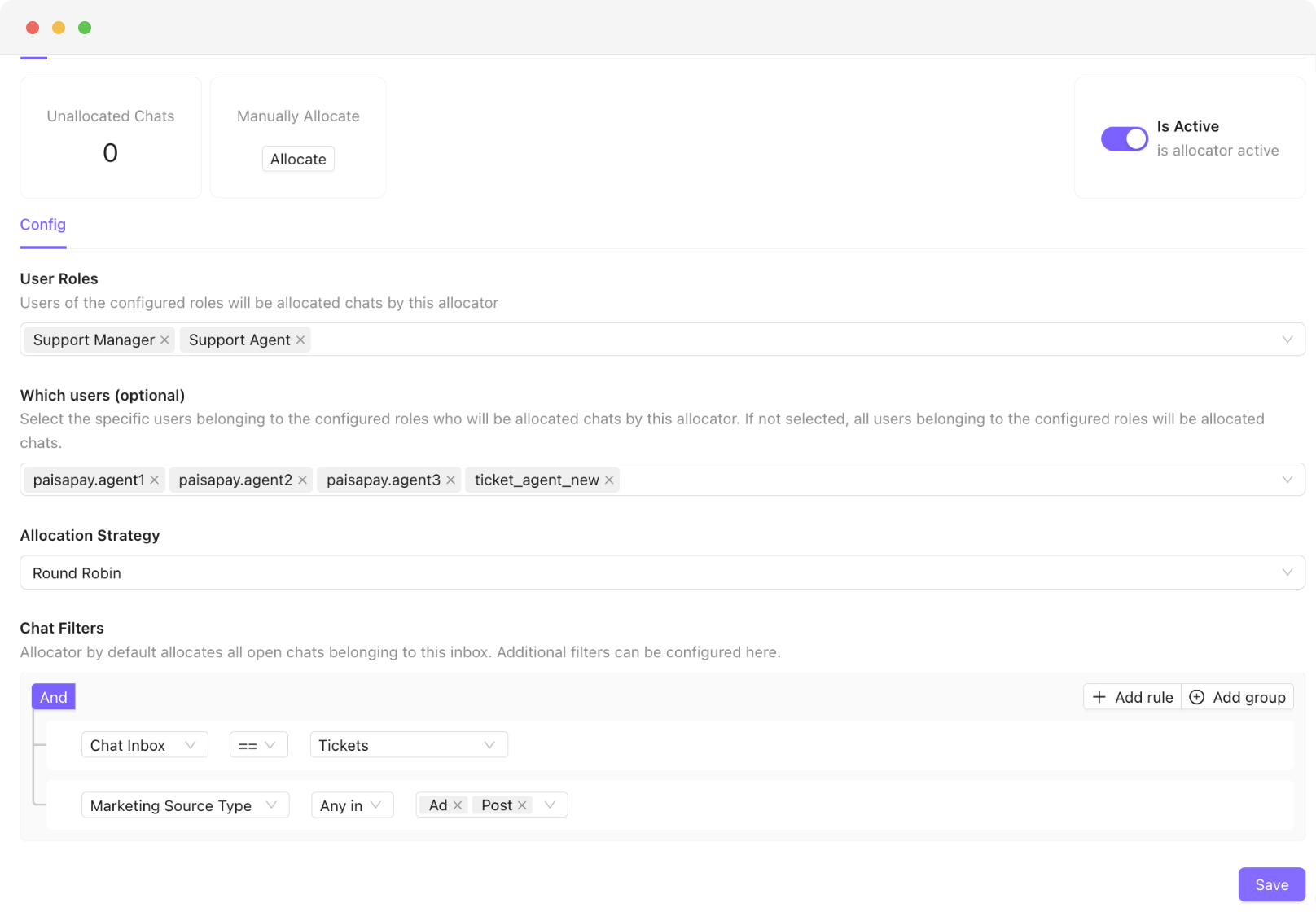
- Auto-Assignment Rules - Assign chats automatically based on number, message type, or sticky agent rules - or allocate manually in one click
- Role-Based Access - Agents see only their relevant chats while managers and admins retain full team visibility.
- Instant Notifications - Every agent is alerted immediately to new assignments and incoming messages - no delays, no missed chats.
Search, Filter & Organise
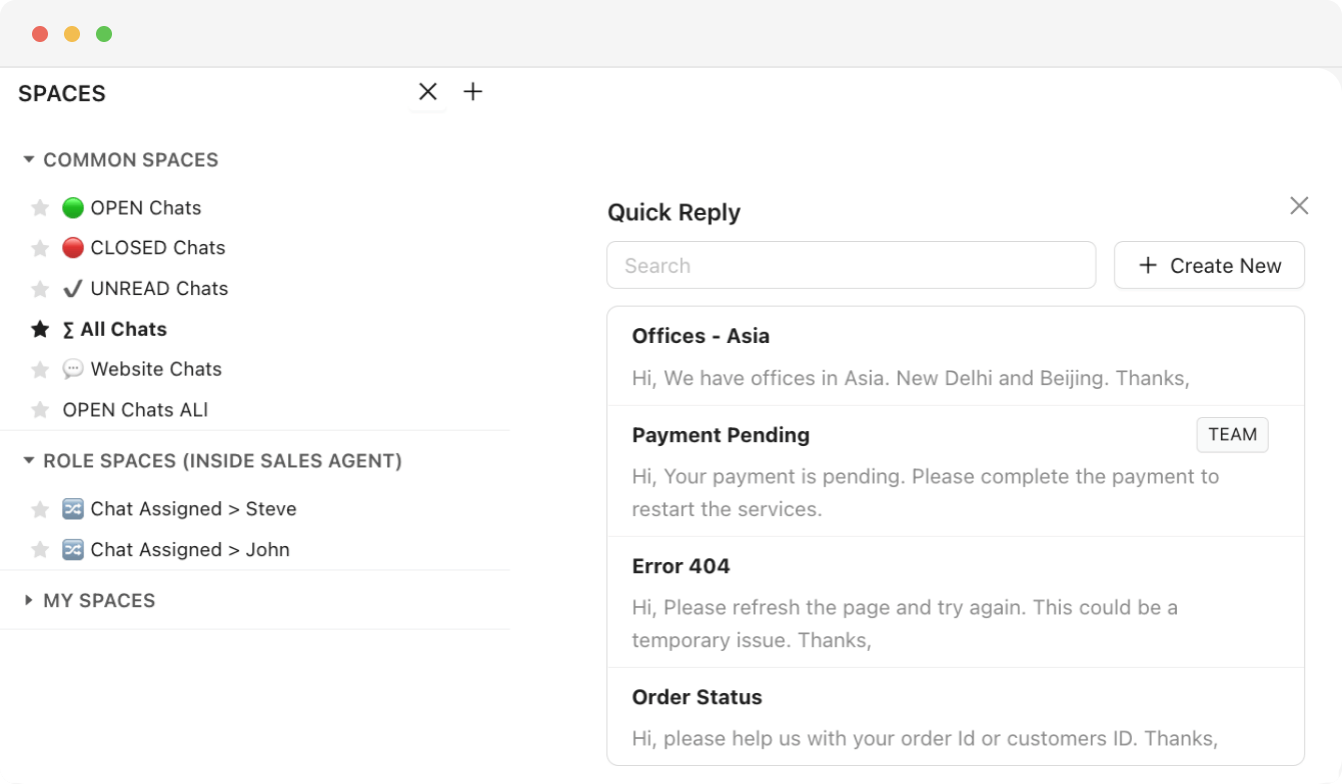
- Smart Search & Filters - Filter chats by status, assignee, number, or label - and surface the right conversation instantly with full-text search
- Saved Spaces - Save frequently used filters as Spaces for one-click access - shared across the team or kept for personal use
- Quick Replies - Respond to common questions instantly with predefined messages to keep response times consistently low
Full Customer Context
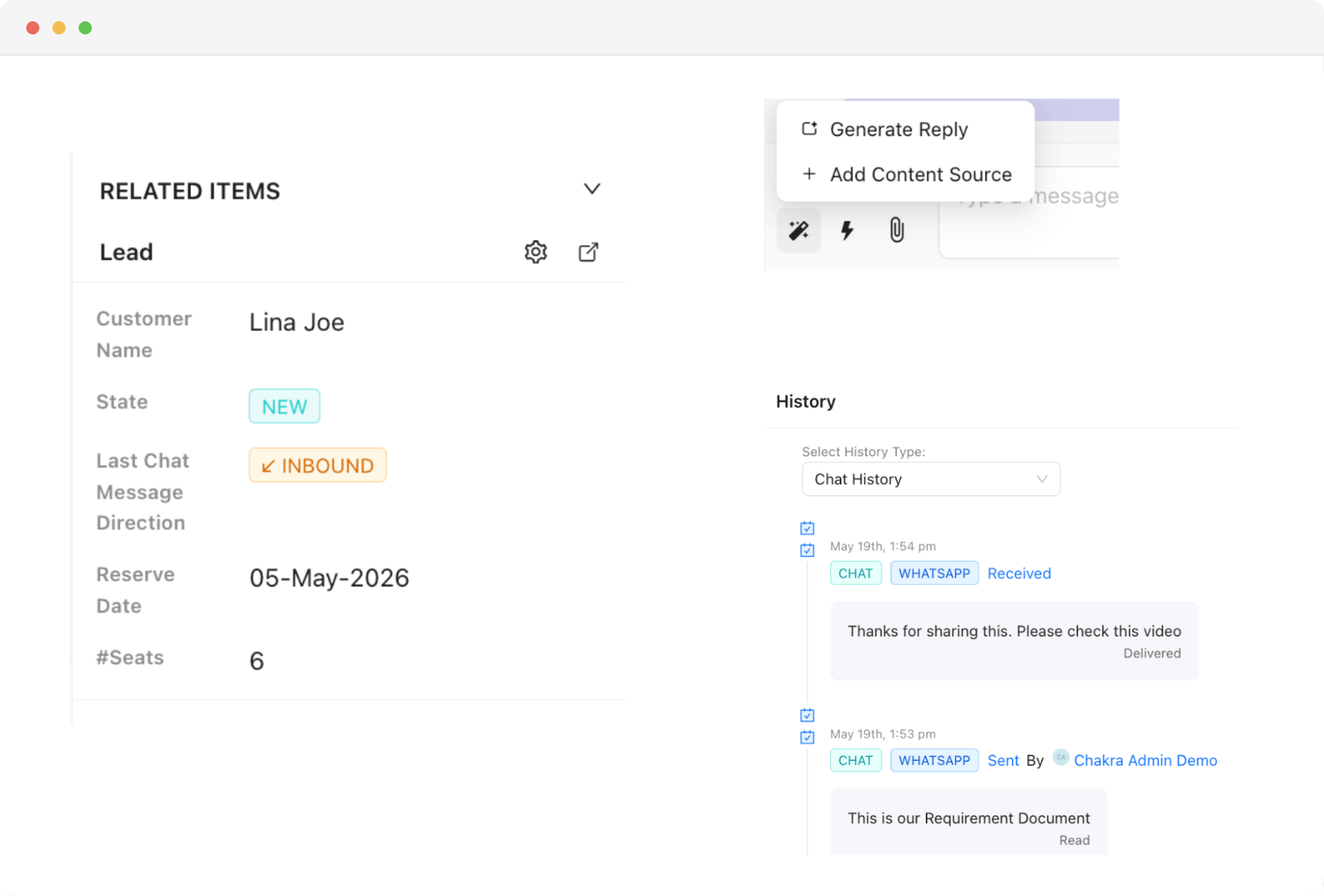
- Complete Chat History - See past interactions, chatbot responses, labels, and custom attributes - all in the chat sidebar
- Linked Lead Profile - Access and update the connected lead - add notes, edit fields, or change status - without leaving the chat window
- AI-Assisted Replies - Contextual reply suggestions help agents respond faster and more accurately in every conversation
WhatsApp: The most engaging communication channel
Reach your customers & leads on their most used messaging platform
- 3000+
- Customers
- 85+
- Countries
- 300M+
- Messages Sent
- 3M+
- Chatbot Sessions
- 2M+
- AI Responses
Send rich and engaging message formats on WhatsApp - photos, rich text, videos, documents, forms, e-commerce products & a lot more. Try them out below!
A unified workspace to manage all your conversations
Get a 360 degree view of everything related to your customer and conversation. Empower your team with smart spaces, AI assists, quick replies, auto allocation and many more advanced tools.
Trusted by 1000+ businesses






Key Features
Team access to all WhatsApp chats
Multiple people can collaborate on the same business WhatsApp account
Access Control
Control which chats are visible to which teams/people
Smart Routing
Detect and route support and sales chats to respective teams
Few words of ❤️ from our customers
Get Started With WhatsApp API in few Steps
No technical setup, no long onboarding. Be live on WhatsApp API and sending messages in under 15 minutes.
Chakra Chat Sign Up
Create a Chakra Chat Account
Connect WABA Number
Embedded Signup to connect WABA & Number
Chakra Chat Subscription
Subscribe to Chakra Subscription plan
Start Engaging Customers
Start conversations, template message broadcasts
Set up Advanced Features
Setup Auto reply bot, AI agents, WhatsApp Calling
Setup Metrics & Reports
Track Campaign Delivery, Chat Response Time
Frequently Asked Questions
Can multiple team members manage the same WhatsApp number at the same time?
Yes. The shared inbox gives your entire team access to one WhatsApp number simultaneously — every incoming message is visible to the right people in real time, so no conversation gets missed or handled twice.
How does the inbox handle messages coming in across multiple WhatsApp numbers?
All incoming messages across every WhatsApp number connected to your account route into a single shared inbox — so your team doesn't have to switch between separate inboxes or devices to stay on top of conversations.
Can I control which agents see which chats?
Yes. Role-based access means agents only see conversations assigned to them, while managers and admins have full visibility across the entire team. This keeps things organised and prevents agents from accessing chats that aren't theirs to handle.
Will agents be notified when a new chat is assigned to them?
Yes. Every agent gets an instant notification the moment a chat is assigned to them or a new message arrives — so there's no delay between a customer sending a message and an agent knowing about it.
Can agents see past conversations and customer details without switching screens?
Yes. The chat sidebar shows the complete history — previous messages, chatbot interactions, labels, and custom attributes — alongside the linked lead profile. Agents can update notes, edit fields, or change a lead's status without ever leaving the chat window.
Are there tools to help agents respond faster during busy periods?
Yes. Quick Replies let agents send predefined responses to common questions with a single click — keeping response times low even when the inbox is busy. AI-assisted reply suggestions are also available to help agents craft more accurate responses faster.
How do I get a whatsapp business API account?
Chakra is an Official Meta Business Partner, which means you can apply for a WhatsApp Business API account directly through us - quickly and in just a few simple steps.
Which Features Does Chakra Chat Support?
Chakra Chat supports WhatsApp messaging, Team Inbox, WhatsApp Calling, eCommerce Integration, Coexistence, Chatbot, workflows, Lead Management, and AI-powered chat features as part of ChakraHQ’s Service, including the ChakraHQ AI Agent and Core Platform capabilities. Feature availability may vary by plan.
How do I set up and start using Chakra Whatsapp?
Getting started is straightforward. Follow our step-by-step onboarding guide at help.chakrahq.com/chat/getting-started, which walks you through connecting your WhatsApp account, setting up chatbots, and configuring your shared inbox. Our support team is also available to help at any stage.
Does Chakra support the WhatsApp Coexistence feature?
Yes. Chakra supports Coexistence, allowing you to register an existing WhatsApp Business phone number directly on the WhatsApp Business Platform - so you can use both the app and API side by side.
Is Chakra Chat Available in My Country?
Yes. Chakra is available globally, with over 3,000 businesses across 80+ countries already on the platform. Sign up from anywhere and set up your WhatsApp Business API account in minutes.
How does ChakraHQ handle GDPR and DPA compliance?
ChakraHQ’s Data Processing Agreement covers our GDPR transfer mechanism and sub-processor terms. Our Privacy Policy explains how we handle personal data, and our Subprocessors List shows third parties and processing locations. See all policies at https://chakrahq.com/legal or contact legal@chakrahq.com.
Can I customize the chatbots for my business needs?
Yes. You can fully tailor chatbots to handle queries specific to your business - including automated responses, FAQs, and interactive conversation flows, so your customers get instant, relevant support around the clock.
Can I connect multiple numbers in Chakra Chat?
Yes. Chakra's plans support multiple numbers: Starter (2 numbers), Growth (5 numbers), and Advanced (12 numbers). Our new Pro plan supported upto 80 numbers in the plan. Need more? Additional numbers beyond 12 are available at $3/ additional number.
What customer support does Chakra offer?
We provide comprehensive support including tickets, chat and a knowledge base with detailed guides and tutorials. Our team is always on hand to help you resolve issues and get the most out of the platform.
Can I use Chakra's API to send WhatsApp messages from my own application?
Yes. Chakra provides robust REST APIs and webhooks that let you send template and session messages, create and manage templates programmatically, and track all incoming events in real time.
Does Chakra charge any markup on template message fees?
No. Chakra applies zero markup on template messages. You pay only the prevailing WhatsApp Meta messaging rates for successfully delivered messages - nothing more.
How does broadcast messaging work?
Send marketing messages, transactional updates, and authentication OTPs to thousands at once. Manage the full broadcast workflow in one place - from template creation and Meta approval, to audience segmentation, personalisation, and scheduling.
Does ChakraHQ provide a developer solution as part of the WhatsApp Business Platform?
Yes. ChakraHQ provides developer APIs for the WhatsApp Business Platform. You can create API keys, assign least-privilege roles, and authenticate API calls using Bearer tokens. API documentation is available at https://apidocs.chakrahq.com.
Can I integrate the tool with other platforms and systems?
Yes. Chakra integrates with a wide range of CRM systems, e-commerce platforms, and business tools - ensuring smooth data flow across your stack and streamlining day-to-day operations.
How does the shared inbox feature work?
The shared inbox gives your entire team a single, unified space to view, respond to, and assign customer chats. This ensures no message gets missed, queries are handled promptly, and team collaboration stays seamless.
Does Chakra have a partner program?
Yes. Chakra offers an SaaS/ISV Partner Solution designed for SaaS providers and independant other technology providers. It enables you to onboard and manage clients, and embed WhatsApp Business Platform capabilities directly into your own applications. More details - https://chakrahq.com/help/chat/partner/partner-solution-guide