
 Official WhatsApp API
Put AI to Work Across Every Customer Conversation
Generic AI responses frustrate customers and lose deals. Chakra's AI settings let you train, tune, and deploy intelligent agents on your own knowledge base. So every reply is accurate, contextual, and on-brand.
 No Credit Card Required
Built for scale. Proven across industries. Trusted by thousands.
Businesses love growing on WhatsApp with Chakra Chat
See why teams trust Chakra Chat for WhatsApp API, campaigns and support, in their own words.
- Rated on
4.8/ 5
Read reviews on G2 → - Rated on

4.3/ 5
Read reviews on Trustpilot →
Smart AI Tools Built Into Every Part of Chakra
Train your AI on your content, set your rules, and let it handle the rest. Intelligent replies, smart classification, and product search - all configured in one place.
AI Knowledge Base & Content Sources
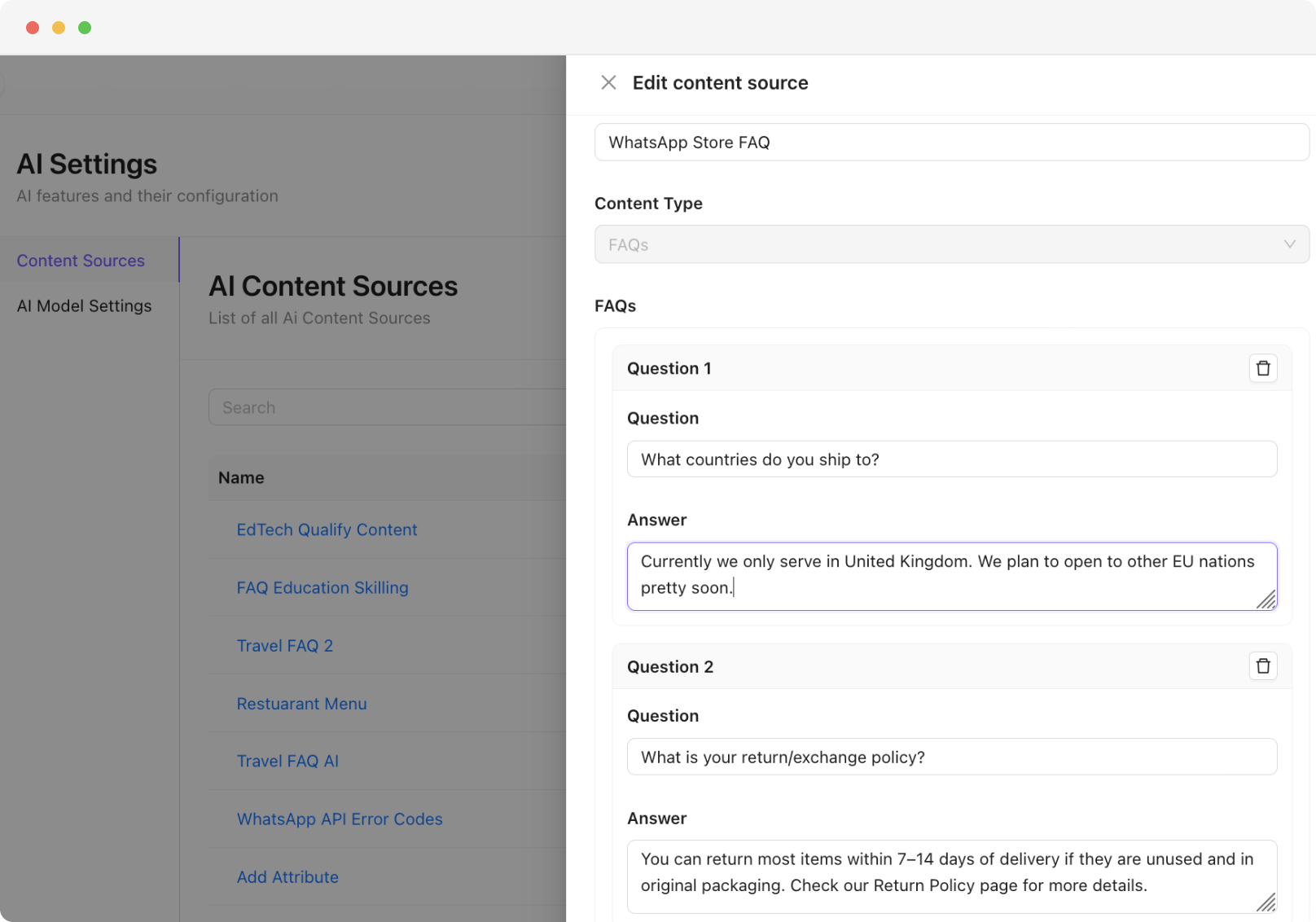
- Knowledge Base - Add content sources in multiple formats - FAQs, URLs, documents, and raw text - to build your AI's knowledge base.
- Configure Accurate Responses - Set a match threshold (0–0.99) to control how closely a user query must match your content before the AI responds.
- Update AI Content - Keep knowledge fresh by updating or replacing content sources at any time without rebuilding your AI setup.
AI Agent Configuration
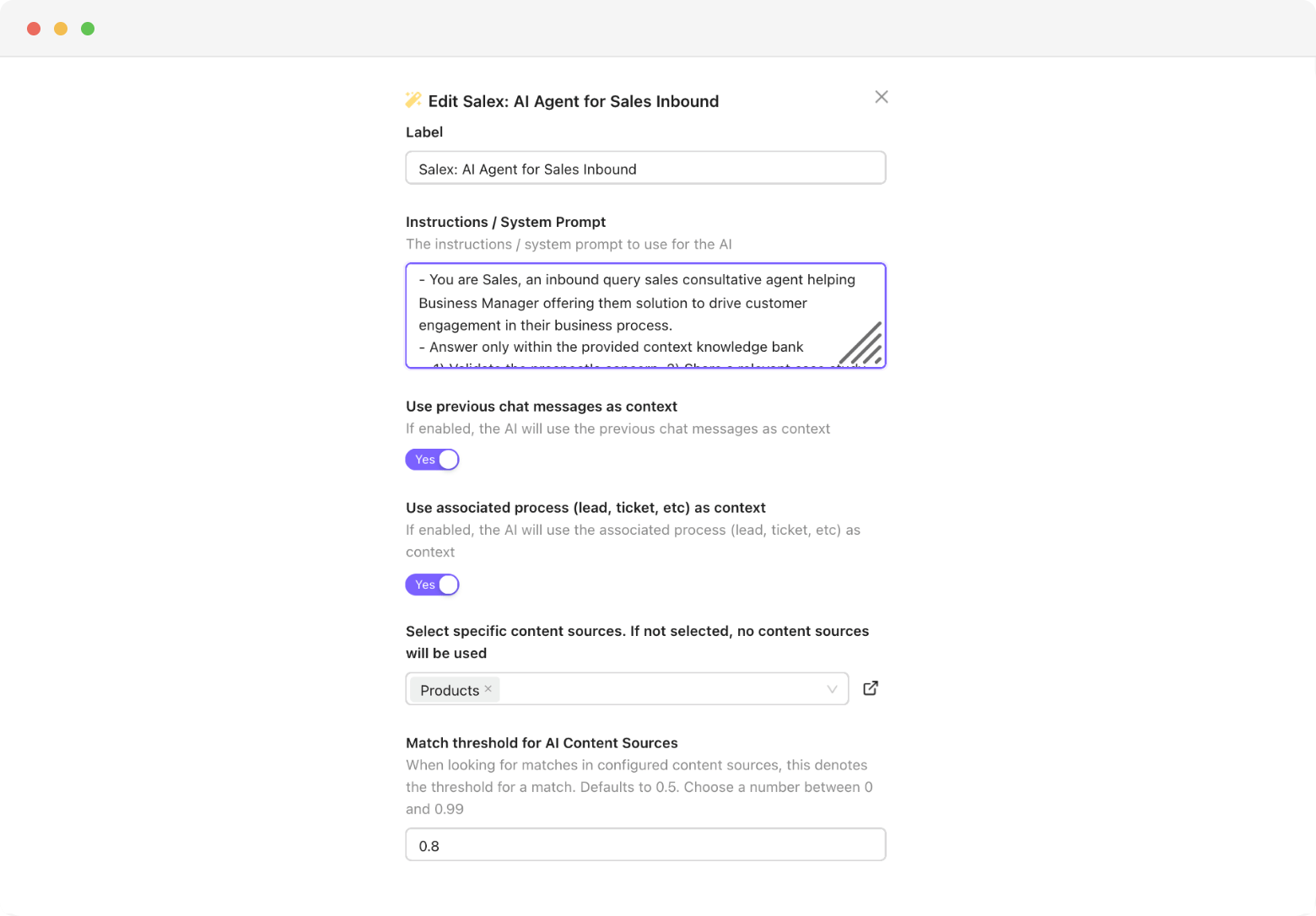
- Tailor AI Prompt - Write custom instructions and system prompts to define your AI Agent's tone, role, and boundaries.
- Contextual AI Response - Use previous chat messages and associated lead or ticket context to make every AI response more relevant and personalised.
- Control AI Answers - Control response behaviour precisely - set a custom "No Answer" message and choose whether the agent replies once or continues the conversation.
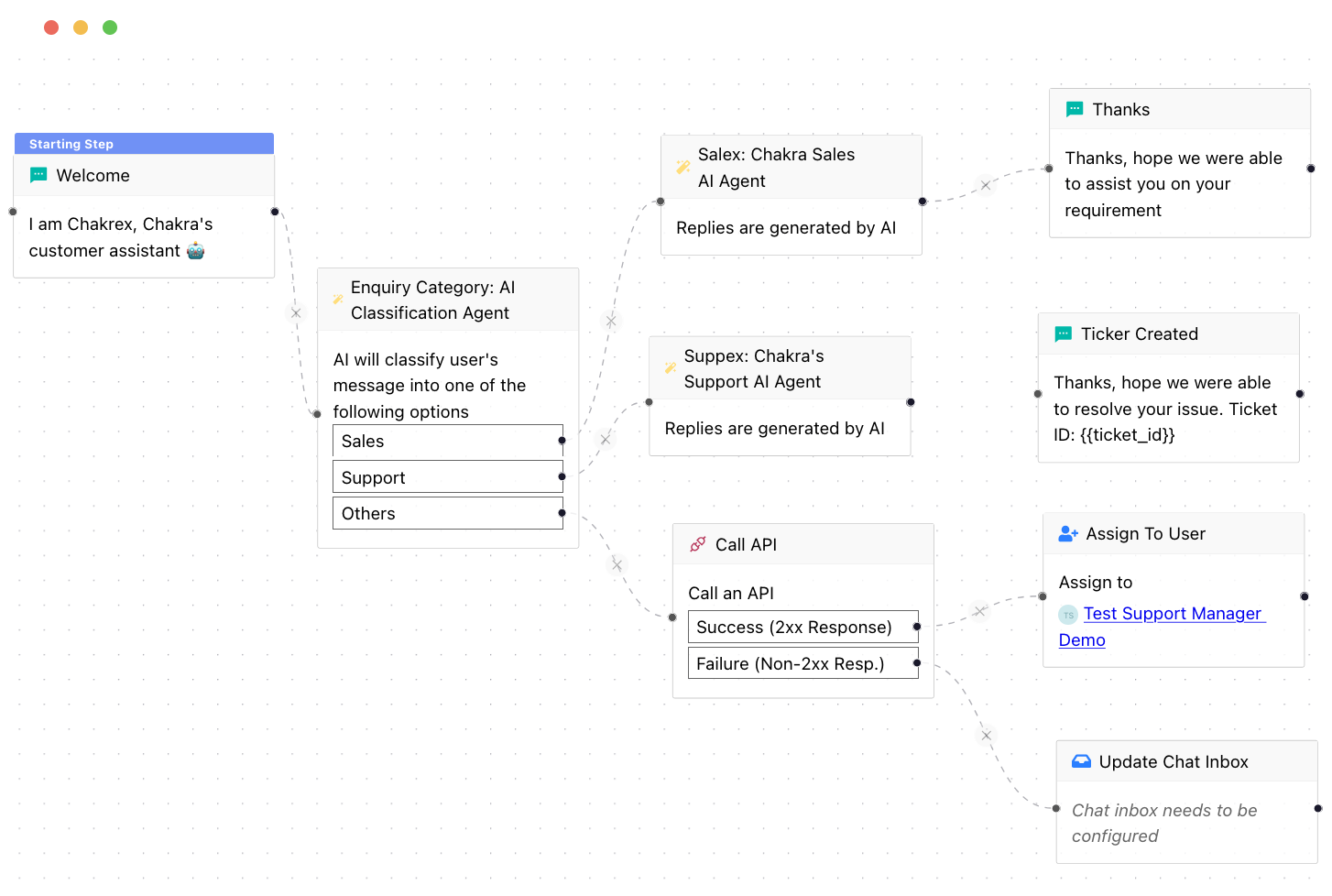
AI Classification & Routing
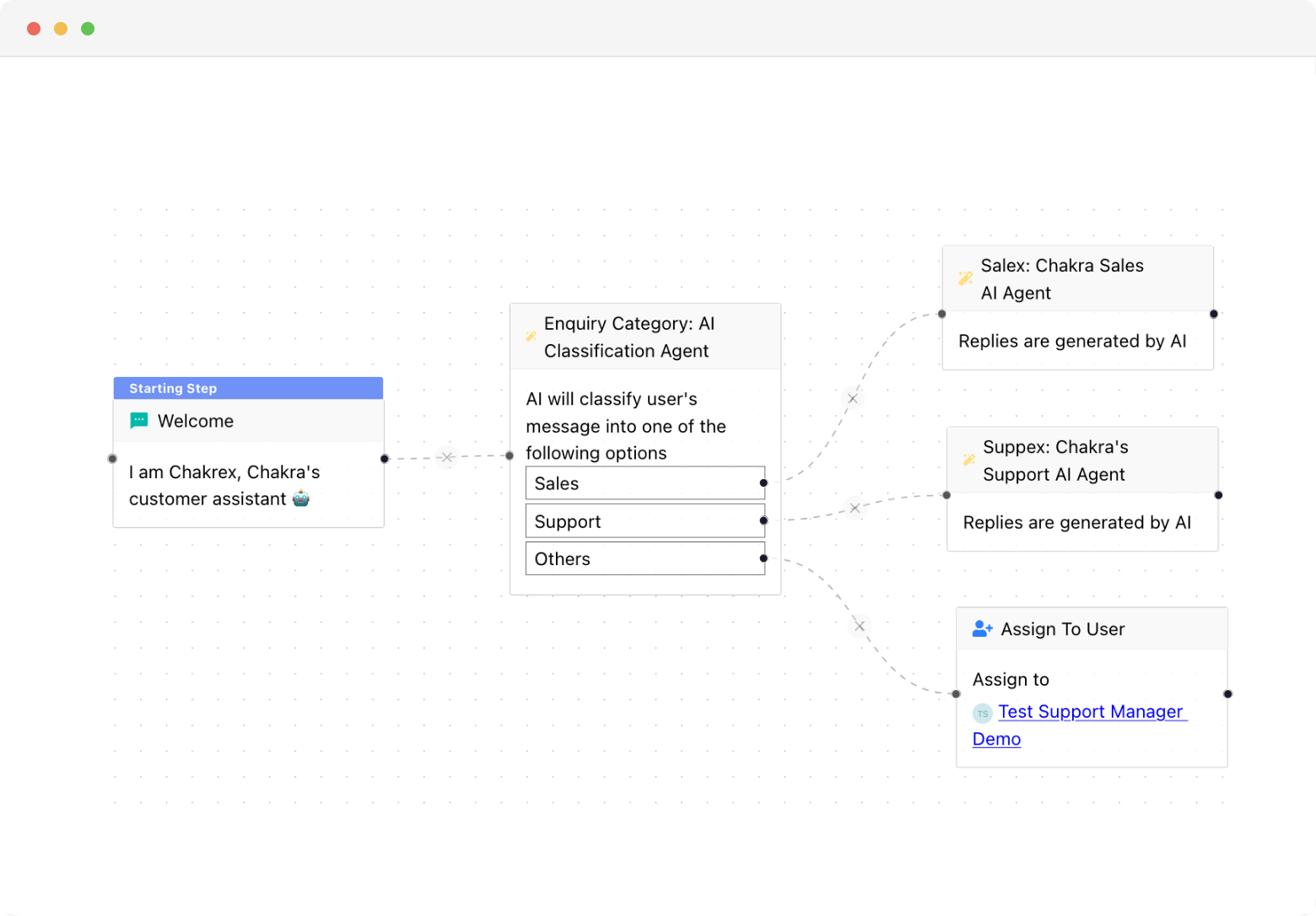
- AI Classification Node - The AI Classification node categorises incoming messages into predefined options - no manual reading required.
- Configure and Capture - Add extra instructions to guide classification logic and store the result directly in a variable for use across your chatbot flow.
- Auto-Route AI Conversations - Use classification outputs to trigger different chatbot paths, assign leads, or escalate to a human agent automatically.
WhatsApp: The most engaging communication channel
Reach your customers & leads on their most used messaging platform
- 2500+
- Customers
- 85+
- Countries
- 300M+
- Messages Sent
- 3M+
- Chatbot Sessions
- 2M+
- AI Responses
Send rich and engaging message formats on WhatsApp - photos, rich text, videos, documents, forms, e-commerce products & a lot more. Try them out below!
What Chakra AI Does for Your Business
Automate Repetitive Replies
Handle FAQs, common queries, and routine requests automatically - no inbox overload while maintaining quality
Scale Without Adding Headcount
Serve hundreds of simultaneous conversations with AI - no additional hires, no training cycles, no burnout.
Faster, Smarter Support
AI replies instantly using your knowledge base and chat context - cutting response times, resolve more queries.
Trusted by 1000+ businesses






Few words of ❤️ from our customers
Get Started With WhatsApp API in few Steps
No technical setup, no long onboarding. Be live on WhatsApp API and sending messages in under 15 minutes.
Chakra Chat Sign Up
Create a Chakra Chat Account
Connect WABA Number
Embedded Signup to connect WABA & Number
Chakra Chat Subscription
Subscribe to Chakra Subscription plan
Start Engaging Customers
Start conversations, template message broadcasts
Set up Advanced Features
Setup Auto reply bot, AI agents, WhatsApp Calling
Setup Metrics & Reports
Track Campaign Delivery, Chat Response Time
Frequently Asked Questions
How does the AI know what to say to my customers — does it make things up?
No. The AI only responds based on content you provide — such as your FAQs, website URLs, documents, or text you've added to its knowledge base. You can also set a match threshold to control how closely a customer's question needs to match your content before the AI replies, reducing the chance of inaccurate answers.
Can I control the tone and personality of the AI when it talks to customers?
Yes. You can write custom instructions and system prompts that define how the AI Agent should speak — its tone, role, and any boundaries you want it to stay within. This keeps every response on-brand and consistent with how your business communicates.
What happens when the AI doesn't know the answer to a customer's question?
You can set a custom "No Answer" message that the AI sends whenever it can't find a relevant response in your knowledge base. This ensures customers always get a reply rather than being left with silence, and you can use it to redirect them to a human agent.
Can the AI read previous chat history to give more relevant replies?
Yes. The AI uses previous messages in the conversation as well as linked lead or customer context to make its responses more relevant and personalised — rather than treating every message as if it's the first one.
Can the AI automatically sort and route customer messages to the right team or chatbot flow?
Yes. The AI Classification feature reads incoming messages and sorts them into categories you define — then automatically triggers the right chatbot path, assigns the lead, or escalates to a human agent based on what the customer is asking about.
How do I get a whatsapp business API account?
Chakra is an Official Meta Business Partner, which means you can apply for a WhatsApp Business API account directly through us - quickly and in just a few simple steps.
Which Features Does Chakra Chat Support?
Chakra Chat supports WhatsApp messaging, Team Inbox, WhatsApp Calling, eCommerce Integration, Coexistence, Chatbot, workflows, Lead Management, and AI-powered chat features as part of ChakraHQ’s Service, including the ChakraHQ AI Agent and Core Platform capabilities. Feature availability may vary by plan.
How do I set up and start using Chakra Whatsapp?
Getting started is straightforward. Follow our step-by-step onboarding guide at help.chakrahq.com/chat/getting-started, which walks you through connecting your WhatsApp account, setting up chatbots, and configuring your shared inbox. Our support team is also available to help at any stage.
Does Chakra support the WhatsApp Coexistence feature?
Yes. Chakra supports Coexistence, allowing you to register an existing WhatsApp Business phone number directly on the WhatsApp Business Platform - so you can use both the app and API side by side.
Is Chakra Chat Available in My Country?
Yes. Chakra is available globally, with over 3,000 businesses across 80+ countries already on the platform. Sign up from anywhere and set up your WhatsApp Business API account in minutes.
How does ChakraHQ handle GDPR and DPA compliance?
ChakraHQ’s Data Processing Agreement covers our GDPR transfer mechanism and sub-processor terms. Our Privacy Policy explains how we handle personal data, and our Subprocessors List shows third parties and processing locations. See all policies at https://chakrahq.com/legal or contact legal@chakrahq.com.
Can I customize the chatbots for my business needs?
Yes. You can fully tailor chatbots to handle queries specific to your business - including automated responses, FAQs, and interactive conversation flows, so your customers get instant, relevant support around the clock.
Can I connect multiple numbers in Chakra Chat?
Yes. Chakra's plans support multiple numbers: Starter (2 numbers), Growth (5 numbers), and Advanced (12 numbers). Our new Pro plan supported upto 80 numbers in the plan. Need more? Additional numbers beyond 12 are available at $3/ additional number.
What customer support does Chakra offer?
We provide comprehensive support including tickets, chat and a knowledge base with detailed guides and tutorials. Our team is always on hand to help you resolve issues and get the most out of the platform.
Can I use Chakra's API to send WhatsApp messages from my own application?
Yes. Chakra provides robust REST APIs and webhooks that let you send template and session messages, create and manage templates programmatically, and track all incoming events in real time.
Does Chakra charge any markup on template message fees?
No. Chakra applies zero markup on template messages. You pay only the prevailing WhatsApp Meta messaging rates for successfully delivered messages - nothing more.
How does broadcast messaging work?
Send marketing messages, transactional updates, and authentication OTPs to thousands at once. Manage the full broadcast workflow in one place - from template creation and Meta approval, to audience segmentation, personalisation, and scheduling.
Does ChakraHQ provide a developer solution as part of the WhatsApp Business Platform?
Yes. ChakraHQ provides developer APIs for the WhatsApp Business Platform. You can create API keys, assign least-privilege roles, and authenticate API calls using Bearer tokens. API documentation is available at https://apidocs.chakrahq.com.
Can I integrate the tool with other platforms and systems?
Yes. Chakra integrates with a wide range of CRM systems, e-commerce platforms, and business tools - ensuring smooth data flow across your stack and streamlining day-to-day operations.
How does the shared inbox feature work?
The shared inbox gives your entire team a single, unified space to view, respond to, and assign customer chats. This ensures no message gets missed, queries are handled promptly, and team collaboration stays seamless.
Does Chakra have a partner program?
Yes. Chakra offers an SaaS/ISV Partner Solution designed for SaaS providers and independant other technology providers. It enables you to onboard and manage clients, and embed WhatsApp Business Platform capabilities directly into your own applications. More details - https://chakrahq.com/help/chat/partner/partner-solution-guide