
 Official WhatsApp API
Find, Filter, Organise WhatsApp Chats Instantly
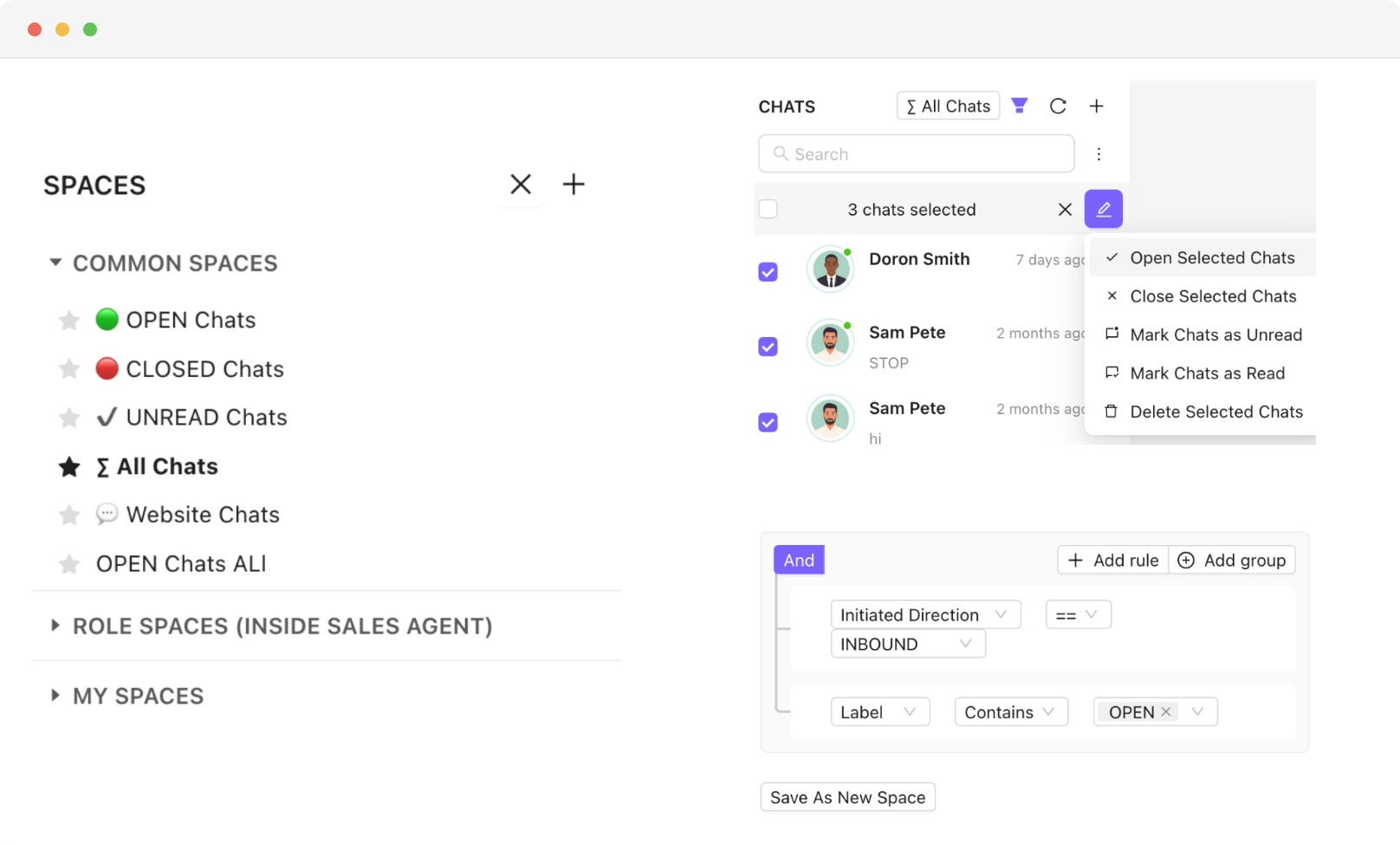
Search chats by name or number in seconds. Filter, label, or sort your inbox your way. Save custom views for yourself, your team, or your role.
 No Credit Card Required
Trusted by 1000+ businesses






WhatsApp: The most engaging communication channel
Reach your customers & leads on their most used messaging platform
- 2500+
- Customers
- 85+
- Countries
- 300M+
- Messages Sent
- 3M+
- Chatbot Sessions
- 2M+
- AI Responses
One Unified WhatsApp Inbox, Totally Under Your Control
Chakra's Chat Inbox gives you powerful search, smart filters, custom labels, and saved spaces; so every conversation is easy to find, manage, and act on.
Find Any Chat in Seconds
- Name & Number Search - Search your entire chat list by customer name or phone number - find any conversation in seconds, no scrolling required
- Smart Sort Options - Sort your inbox by last updated or last message timestamp to always surface the most urgent or recent conversations first
- Bulk Chat Actions - Select multiple chats at once to mark as read/unread, open, close, or delete, manage volume without the repetitive clicks
Filter, Save, and Stay Focused
- Powerful Filter Attributes - Filter chats by inbound/outbound, unread, not replied, phone number, assigned agent, chat labels, and more to zero in on what matters.
- One-Click Saved Spaces - Save any filter combination as a Space for instant one-click access — no need to rebuild filters every time you log in
- Flexible Visibility Controls - Save Spaces for yourself, your team, or a specific role - each Space is visible only to the users it's shared with
- Always-On Context - Spaces keep agents focused on their relevant queue without distraction from conversations outside their scope
Label Chats Your Way
- Custom Label Creation - Create chat labels using your own attributes — name them, define them, and apply them to any conversation in your inbox
- Custom Colour Coding - Assign unique colours to each label for instant visual recognition across your inbox at a glance
- Labels as Filters - Use chat labels as filter criteria to instantly pull up all conversations tagged under a specific label or workflow stage
Spend Less Time Searching, More Time Closing.
Full Inbox Control
Search, sort, and bulk-act on chats in seconds; so your team spends time on conversations, not hunting for them
Built for Every Team
Saved Spaces with role-level visibility mean every agent, team lead, and manager sees exactly the queue that's relevant to them.
Context at a Glance
Custom labels with colour coding give your inbox instant visual structure; making it easy to prioritise, triage, and track chats
Few words of ❤️ from our customers
Get Started With WhatsApp API in few Steps
No technical setup, no long onboarding. Be live on WhatsApp API and sending messages in under 15 minutes.
Chakra Chat Sign Up
Create a Chakra Chat Account
Connect WABA Number
Embedded Signup to connect WABA & Number
Chakra Chat Subscription
Subscribe to Chakra Subscription plan
Start Engaging Customers
Start conversations, template message broadcasts
Set up Advanced Features
Setup Auto reply bot, AI agents, WhatsApp Calling
Setup Metrics & Reports
Track Campaign Delivery, Chat Response Time
Frequently Asked Questions
How do I quickly find a specific customer's chat in a busy inbox?
You can search by the customer's name or phone number and pull up their conversation instantly — no scrolling through hundreds of chats. You can also sort your inbox by most recent message or last updated to keep the most urgent chats at the top.
Can I filter my WhatsApp inbox to see only chats assigned to me?
Yes. You can filter chats by assigned agent, so each team member only sees the conversations they're responsible for. You can also filter by unread, not replied, chat labels, inbound or outbound, and more.
What are Spaces and how do they help my team stay organised?
Spaces let you save any filter combination as a shortcut — so instead of setting up the same filters every time you log in, you just click the saved Space and your inbox is instantly organised the way you need it. You can create Spaces for yourself, your whole team, or a specific role.
Can I add labels to WhatsApp chats to track where a customer is in the process?
Yes. You can create your own custom labels — like "Follow Up", "Hot Lead", or "Pending Payment" — and apply them to any chat. Each label can have its own colour so your team can visually spot the right chats at a glance without reading every conversation.
Can I take action on multiple chats at once instead of one at a time?
Yes. You can select multiple chats and bulk-action them — mark as read, open, close, or delete — all in one go. This is especially useful when your inbox gets busy and you need to clear or organise a large number of conversations quickly.
How do I get a whatsapp business API account?
Chakra is an Official Meta Business Partner, which means you can apply for a WhatsApp Business API account directly through us - quickly and in just a few simple steps.
Which Features Does Chakra Chat Support?
Chakra Chat supports WhatsApp messaging, Team Inbox, WhatsApp Calling, eCommerce Integration, Coexistence, Chatbot, workflows, Lead Management, and AI-powered chat features as part of ChakraHQ’s Service, including the ChakraHQ AI Agent and Core Platform capabilities. Feature availability may vary by plan.
How do I set up and start using Chakra Whatsapp?
Getting started is straightforward. Follow our step-by-step onboarding guide at help.chakrahq.com/chat/getting-started, which walks you through connecting your WhatsApp account, setting up chatbots, and configuring your shared inbox. Our support team is also available to help at any stage.
Does Chakra support the WhatsApp Coexistence feature?
Yes. Chakra supports Coexistence, allowing you to register an existing WhatsApp Business phone number directly on the WhatsApp Business Platform - so you can use both the app and API side by side.
Is Chakra Chat Available in My Country?
Yes. Chakra is available globally, with over 3,000 businesses across 80+ countries already on the platform. Sign up from anywhere and set up your WhatsApp Business API account in minutes.
How does ChakraHQ handle GDPR and DPA compliance?
ChakraHQ’s Data Processing Agreement covers our GDPR transfer mechanism and sub-processor terms. Our Privacy Policy explains how we handle personal data, and our Subprocessors List shows third parties and processing locations. See all policies at https://chakrahq.com/legal or contact legal@chakrahq.com.
Can I customize the chatbots for my business needs?
Yes. You can fully tailor chatbots to handle queries specific to your business - including automated responses, FAQs, and interactive conversation flows, so your customers get instant, relevant support around the clock.
Can I connect multiple numbers in Chakra Chat?
Yes. Chakra's plans support multiple numbers: Starter (2 numbers), Growth (5 numbers), and Advanced (12 numbers). Our new Pro plan supported upto 80 numbers in the plan. Need more? Additional numbers beyond 12 are available at $3/ additional number.
What customer support does Chakra offer?
We provide comprehensive support including tickets, chat and a knowledge base with detailed guides and tutorials. Our team is always on hand to help you resolve issues and get the most out of the platform.
Can I use Chakra's API to send WhatsApp messages from my own application?
Yes. Chakra provides robust REST APIs and webhooks that let you send template and session messages, create and manage templates programmatically, and track all incoming events in real time.
Does Chakra charge any markup on template message fees?
No. Chakra applies zero markup on template messages. You pay only the prevailing WhatsApp Meta messaging rates for successfully delivered messages - nothing more.
How does broadcast messaging work?
Send marketing messages, transactional updates, and authentication OTPs to thousands at once. Manage the full broadcast workflow in one place - from template creation and Meta approval, to audience segmentation, personalisation, and scheduling.
Does ChakraHQ provide a developer solution as part of the WhatsApp Business Platform?
Yes. ChakraHQ provides developer APIs for the WhatsApp Business Platform. You can create API keys, assign least-privilege roles, and authenticate API calls using Bearer tokens. API documentation is available at https://apidocs.chakrahq.com.
Can I integrate the tool with other platforms and systems?
Yes. Chakra integrates with a wide range of CRM systems, e-commerce platforms, and business tools - ensuring smooth data flow across your stack and streamlining day-to-day operations.
How does the shared inbox feature work?
The shared inbox gives your entire team a single, unified space to view, respond to, and assign customer chats. This ensures no message gets missed, queries are handled promptly, and team collaboration stays seamless.
Does Chakra have a partner program?
Yes. Chakra offers an SaaS/ISV Partner Solution designed for SaaS providers and independant other technology providers. It enables you to onboard and manage clients, and embed WhatsApp Business Platform capabilities directly into your own applications. More details - https://chakrahq.com/help/chat/partner/partner-solution-guide