
 API oficial do WhatsApp
Build WhatsApp Chatbots Without Writing Code
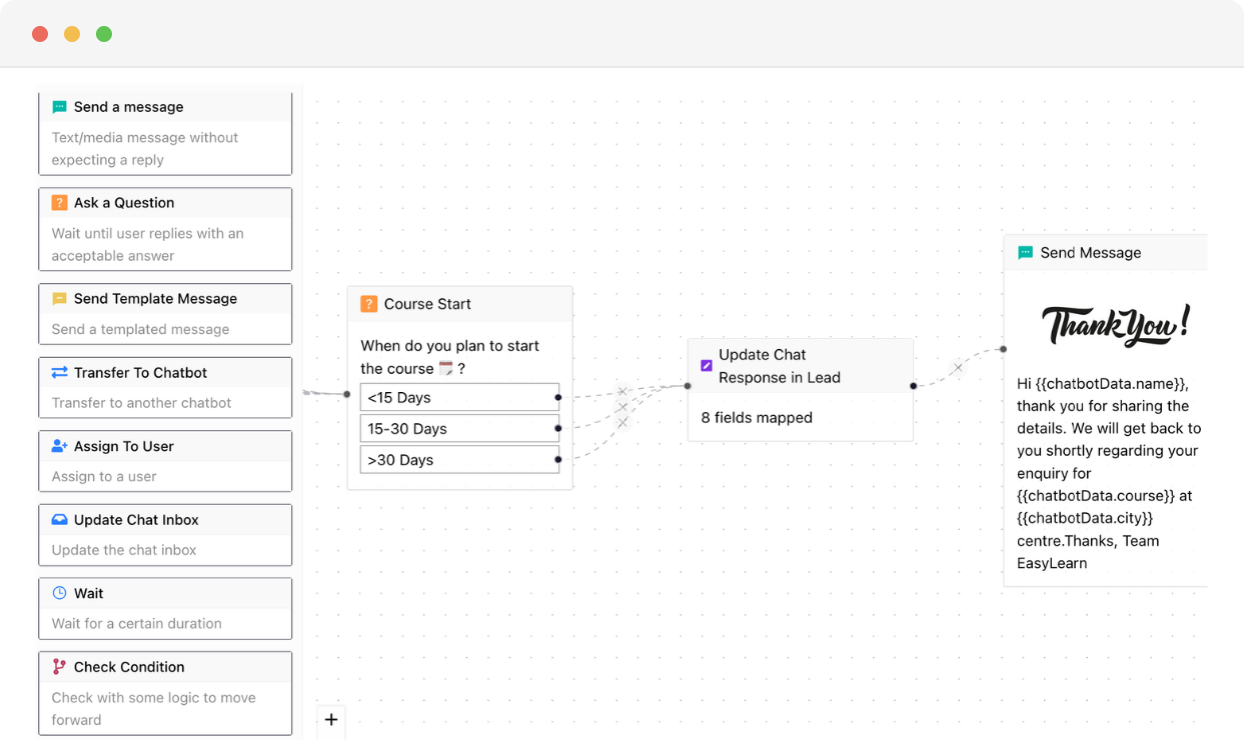
Design automated WhatsApp flows with a visual drag-and-drop builder. Choose from 15+ nodes — AI, payment, API, assign to human, and more. Launch smarter conversations without writing a single line of code.
 Não é necessário cartão de crédito
Built for scale. Proven across industries. Trusted by thousands.
Businesses love growing on WhatsApp with Chakra Chat
See why teams trust Chakra Chat for WhatsApp API, campaigns and support, in their own words.
- Avaliado no
4.8/ 5
Read reviews on G2 → - Avaliado no

4.3/ 5
Read reviews on Trustpilot →
Every Tool You Need to Build Smarter Bots
From simple FAQ bots to complex multi-step flows, Chakra's Chatbot Builder gives you the nodes, templates, and controls to automate any WhatsApp conversation.
Build Any Flow Visually
- Drag-and-Drop Builder - Arrange nodes visually on an infinite canvas — zoom in, zoom out, lock editing, and preview your flow as you build, no code at any step.
- 15+ Powerful Nodes - Choose from Message, Question, Payment, AI Node, API Node, Assign to Human, Transfer Chatbot, Update Response Data, Wait, and more to handle any conversation scenario.
- Ready-Made Templates - Browse, preview, and apply chatbot templates to get started instantly — customise to your needs or build from scratch with full flexibility.
Configure Every Node Your Way
- Granular Node Control - Name each node, store user responses as variables, specify reply format — text, document, or other media — and allow responses outside predefined options.
- Trigger from Anywhere - Set any node as an entry point — trigger flows from a keyword, a campaign, a chat label, or a handoff from another bot seamlessly.
- Manage Your Bot Library - Search, clone, rename, and delete chatbots from a central list — keeping your workspace organised as your automation library grows.
WhatsApp: o canal de comunicação que mais engaja
Alcance seus clientes e leads na plataforma de mensagens que eles mais usam
- 3000+
- Customers
- 85+
- Countries
- 300M+
- Messages Sent
- 3M+
- Chatbot Sessions
- 2M+
- AI Responses
Automate Conversations and Reclaim Your Team's Time
Launch Faster
Use pre-built templates to go live in minutes; no developer, no delay, no back-and-forth with technical resources.
Handle Any Scenario
With 15+ nodes including AI, API, and payment, one chatbot can qualify leads, collect payments, and escalate to a human.
Stay in Control
Clone, iterate, and manage your entire bot library from one place; automate as your business scales.
Mais de 1000 empresas confiam em nós






Algumas palavras de ❤️ dos nossos clientes
Get Started With WhatsApp API in few Steps
No technical setup, no long onboarding. Be live on WhatsApp API and sending messages in under 15 minutes.
Chakra Chat Sign Up
Create a Chakra Chat Account
Connect WABA Number
Embedded Signup to connect WABA & Number
Chakra Chat Subscription
Subscribe to Chakra Subscription plan
Start Engaging Customers
Start conversations, template message broadcasts
Set up Advanced Features
Setup Auto reply bot, AI agents, WhatsApp Calling
Setup Metrics & Reports
Track Campaign Delivery, Chat Response Time
Perguntas frequentes
Do I need coding skills to build a WhatsApp chatbot on Chakra?
No. The Chakra chatbot builder uses a drag-and-drop visual interface — you design conversation flows by connecting nodes on a canvas. No coding or technical setup is required to go from blank canvas to a live chatbot.
Can I test my chatbot before making it live?
Yes. There's a built-in preview mode that simulates real WhatsApp interactions, so you can walk through the entire conversation flow and catch issues before your customers ever see it.
What triggers can I use to launch a WhatsApp chatbot automatically?
Chatbots can be triggered based on inbound keywords, campaign sources, user attributes, or custom events. You can also define custom start, stop, and restart keywords to give customers control over the conversation.
Can the chatbot handle payments and product orders end-to-end?
Yes. Using Flow Control and Action nodes, the chatbot can send payment links, display catalog options, and complete order actions — all within the WhatsApp conversation, without redirecting customers to an external page.
Can I connect multiple chatbots together or hand off to a live agent mid-conversation?
Yes. Chakra supports chatbot-to-chatbot routing, letting you chain bots together based on user responses or conditions. You can also use Transfer nodes to hand off seamlessly to a human agent at any point in the flow.
How do I get a whatsapp business API account?
Chakra is an Official Meta Business Partner, which means you can apply for a WhatsApp Business API account directly through us - quickly and in just a few simple steps.
Which Features Does Chakra Chat Support?
Chakra Chat supports WhatsApp messaging, Team Inbox, WhatsApp Calling, eCommerce Integration, Coexistence, Chatbot, workflows, Lead Management, and AI-powered chat features as part of ChakraHQ’s Service, including the ChakraHQ AI Agent and Core Platform capabilities. Feature availability may vary by plan.
How do I set up and start using Chakra Whatsapp?
Getting started is straightforward. Follow our step-by-step onboarding guide at help.chakrahq.com/chat/getting-started, which walks you through connecting your WhatsApp account, setting up chatbots, and configuring your shared inbox. Our support team is also available to help at any stage.
Does Chakra support the WhatsApp Coexistence feature?
Yes. Chakra supports Coexistence, allowing you to register an existing WhatsApp Business phone number directly on the WhatsApp Business Platform - so you can use both the app and API side by side.
Is Chakra Chat Available in My Country?
Yes. Chakra is available globally, with over 3,000 businesses across 80+ countries already on the platform. Sign up from anywhere and set up your WhatsApp Business API account in minutes.
How does ChakraHQ handle GDPR and DPA compliance?
ChakraHQ’s Data Processing Agreement covers our GDPR transfer mechanism and sub-processor terms. Our Privacy Policy explains how we handle personal data, and our Subprocessors List shows third parties and processing locations. See all policies at https://chakrahq.com/legal or contact legal@chakrahq.com.
Can I customize the chatbots for my business needs?
Yes. You can fully tailor chatbots to handle queries specific to your business - including automated responses, FAQs, and interactive conversation flows, so your customers get instant, relevant support around the clock.
Can I connect multiple numbers in Chakra Chat?
Yes. Chakra's plans support multiple numbers: Starter (2 numbers), Growth (5 numbers), and Advanced (12 numbers). Our new Pro plan supported upto 80 numbers in the plan. Need more? Additional numbers beyond 12 are available at $3/ additional number.
What customer support does Chakra offer?
We provide comprehensive support including tickets, chat and a knowledge base with detailed guides and tutorials. Our team is always on hand to help you resolve issues and get the most out of the platform.
Can I use Chakra's API to send WhatsApp messages from my own application?
Yes. Chakra provides robust REST APIs and webhooks that let you send template and session messages, create and manage templates programmatically, and track all incoming events in real time.
Does Chakra charge any markup on template message fees?
No. Chakra applies zero markup on template messages. You pay only the prevailing WhatsApp Meta messaging rates for successfully delivered messages - nothing more.
How does broadcast messaging work?
Send marketing messages, transactional updates, and authentication OTPs to thousands at once. Manage the full broadcast workflow in one place - from template creation and Meta approval, to audience segmentation, personalisation, and scheduling.
Does ChakraHQ provide a developer solution as part of the WhatsApp Business Platform?
Yes. ChakraHQ provides developer APIs for the WhatsApp Business Platform. You can create API keys, assign least-privilege roles, and authenticate API calls using Bearer tokens. API documentation is available at https://apidocs.chakrahq.com.
Can I integrate the tool with other platforms and systems?
Yes. Chakra integrates with a wide range of CRM systems, e-commerce platforms, and business tools - ensuring smooth data flow across your stack and streamlining day-to-day operations.
How does the shared inbox feature work?
The shared inbox gives your entire team a single, unified space to view, respond to, and assign customer chats. This ensures no message gets missed, queries are handled promptly, and team collaboration stays seamless.
Does Chakra have a partner program?
Yes. Chakra offers an SaaS/ISV Partner Solution designed for SaaS providers and independant other technology providers. It enables you to onboard and manage clients, and embed WhatsApp Business Platform capabilities directly into your own applications. More details - https://chakrahq.com/help/chat/partner/partner-solution-guide