

SaaS/ISV Partner Solution Guide
Chakra Chat Partner Solution is, how it works, who it is designed for, and answers to common technical questions from partners.
Chakra Chat Partner Solution
Overview
The Chakra Chat Partner Solution is an API-first WhatsApp Business integration solution for businesses (SaaS, IT Service providers , ISVs, other) that want to embed WhatsApp messaging capabilities directly into their own product or platform.
Instead of building WhatsApp API infrastructure from scratch, partners use Chakra Chat as the underlying integration layer — managing their clients' WhatsApp Business Accounts (WABAs), automating messaging, and handling incoming events through Chakra's APIs.
Partners access and manage everything through a single partner account, with Chakra handling the API gateway, authentication, routing, and compliance with Meta's WhatsApp Business Platform.
API documentation link: apidocs.chakrahq.com
What You Can Do as a Partner
Embed WhatsApp SetUp
Chakra provides an Embedded Signup (ES) flow that you can integrate directly into your application. Your customers can connect their WhatsApp phone number and WABA from within your UI, without needing to visit Chakra's interface.
- Create and manage WhatsApp Channels and WABAs programmatically
- Add and manage multiple phone numbers across client accounts
- Control customer WhatsApp channels using plugins and APIs
Embedded Signup Integration Guide
Manage Multiple Clients
The partner architecture supports multi-tenancy. You can manage hundreds of client WhatsApp accounts from a single partner login using one API key for all client WABAs.
- Centralized API gateway for all client accounts
- Single partner-level API key for sending messages across all client WABAs
- Webhook routing per plugin, with WABA ID included in incoming payloads for identification
Automate Messaging
- Send broadcast and template messages
- Manage chat sessions with interactive media
- Configure chatbots and chat agent routing
- Listen to incoming messages via webhooks
- Use WhatsApp Flows
- Create and manage message templates via API
- Add leads to Chakra Campaigns programmatically
Track and Troubleshoot
- Access API logs for monitoring and debugging
- Build usage reports for client management
- Store your own copy of chat events using webhooks
Partner Pricing
Chakra Chat's pricing model is straightforward and partner-friendly. The Billing is Split for Product Subscription and Template Messaging Charges:
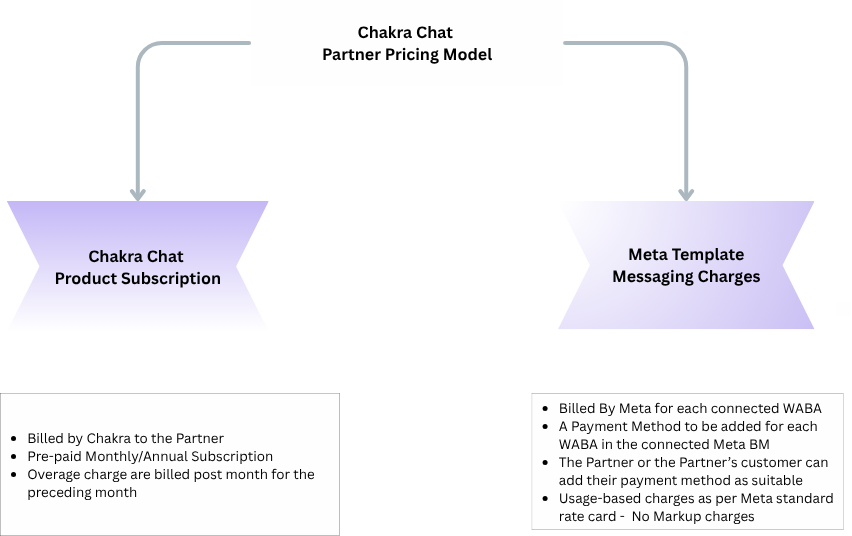
- Subscription-based: Subscribe to ADVANCED Chakra Chat plan ($49.99) to access all Chakra Chat Features
- For upto 12 Number use the Advanced Plan
- For additional number greated than 12, additional charges apply per connected number at $2.99 per extra number
- Every Partner's Customer need to add a Payment Method in Meta Business Manager for Template Messaging Charges.
- Additional numbers: Add extra WhatsApp numbers beyond the base plan for just $3 per number - ideal for agencies and multi-client SaaS platforms managing many accounts.
- No markup on template messaging: Template messaging charges (Marketing, Utility, Authentication categories) are billed directly by Meta (WhatsApp) to your client's connected WABA at standard Meta rates. Chakra does not add any markup - saving your clients 20–25% compared to some other solutions.
This split billing model keeps your subscription costs predictable while ensuring your clients pay Meta directly for message consumption - a transparent, trust-building setup for agency-client relationships.
A 7-day free trial with full feature and API access is available, with the option to extend if you need more evaluation time.
Who This Solution Is For
The Partner Solution is designed for two types of businesses:
SaaS Providers
Software platforms serving specific vertical industries — such as spa management, clinic management, real estate, HR, field service, or e-commerce — that want to offer WhatsApp automation natively inside their product.
ISV (Independant Software Vendors)
Independent software vendors can integrate the Whatsapp Business Platform using Chakra Chat APIs within their product to add greater value to their existing solution.
Tech/IT Service Providers
IT service provider companies providing marketing , sales and engagement solution or managing the service for multiple clients.
Agencies and Marketing Platforms
Digital agencies and marketing technology companies that run WhatsApp campaigns, chatbots, and automated messaging on behalf of multiple clients.
✅ Good fit if you: Need to manage WhatsApp for multiple clients or end-users from one platform Want to embed WhatsApp onboarding and messaging inside your own product UI Require programmatic control over WABAs, templates, and messaging flows Are looking for scalable, API-first WhatsApp infrastructure without building it yourself |
Solution Fit For?
Please review the following before proceeding with the Partner Solution:
1. Your clients want to use the Chakra Chat interface directly
The Partner Solution is designed for partners who embed Chakra's capabilities inside their own product. If your clients need access to Chakra's native UI for features like Chat inbox, Campaigns, or Chatbot management, a standard Chakra Chat subscription may be more appropriate.
2. You need unified billing for Meta messaging charges
Chakra charges a subscription fee directly to the partner. Meta's template messaging charges (Marketing, Utility, Authentication) are billed by Meta directly to each client's connected WABA at standard Meta rates — there is no markup. If you require a single consolidated invoice for both platform and messaging costs, this billing structure may not suit your needs.
3. You want to become a registered Meta Tech Provider
Chakra cannot register you as a Tech Provider or Solution Partner within Meta's ecosystem. You will operate as Chakra's partner, and your clients will register their WhatsApp numbers through Chakra's Embedded Signup. You will manage their accounts and messaging via Chakra's APIs.
⚠️ Before you proceed: Ensure your clients are comfortable with Meta billing them directly for template messaging Confirm your use case involves your own product UI — not Chakra's interface Review the pricing page for phone number limits per plan: chakrahq.com/product/chakra-chat/pricing/ |
Frequently Asked Questions
1. API & Webhooks
Q: Can we use Chakra purely as an API provider, without the chatbot builder, inbox, or UI?
Yes — Chakra can be used purely as an API provider, integrating the solution into your own internal application. You can build your own inbox, chatbot logic, and CRM entirely on your own side.
Q: Do you provide raw, real-time webhooks for all incoming messages (text, images, replies)?
Yes. See the pass-through events webhook documentation.
Q: Do your webhooks include message statuses (delivery/read receipts) and conversation identifiers, not just message content — enough to build our own inbox/CRM?
Yes — confirmed. Incoming webhooks include message content and media, delivery status, and identifiers (WABA ID, Plugin ID, Phone Number ID) so every event can be attributed to the right client and conversation. See the API documentation for the full event list.
Q: Do messages pass through Chakra only, or are they also directly accessible via Meta APIs?
Meta APIs are not directly accessible to customers. Chakra provides pass-through APIs that mirror Meta's request/response payloads. See the API reference.
Q: What is the average webhook delivery delay for incoming messages?
Typically 1–500 ms, depending on the delay with which Meta sends the event after a message is sent.
Q: Are there any rate limits on the API we should be aware of?
Yes — see the API rate limits documentation.
Q: Is there API documentation beyond apidocs.chakrahq.com specifically for partner/multi-tenant use cases?
The same API docs cover the partner/multi-tenant solution — there isn't a separate doc set.
Q: What is the API structure for sending messages through a specific client/plugin — one token per plugin, or one token for the whole account?
A single partner-level API key is used for the entire account. The plugin ID is passed as a routing parameter to direct the message to a specific client's WhatsApp number. See Send Template Message for a Phone Number.
Q: Does the incoming webhook payload include the plugin ID or WABA ID so we can identify which client the message belongs to?
Yes — the incoming webhook event includes the WABA ID (Plugin ID and Phone Number ID are also usable for identification).
Q: Do inbound message webhooks fire independently per tenant, tagged by Phone Number ID / Tenant ID?
Each tenant maps to a Chakra Plugin, and you can connect one or multiple phone numbers per tenant/plugin. A webhook can be configured per tenant/plugin programmatically.
Q: Do we get direct access to raw WhatsApp Cloud API webhooks and endpoints, or only what Chakra exposes?
Chakra provides a comprehensive set of APIs covering both Chakra-specific functionality and pass-through access to certain Meta endpoints. See the full API documentation.
Q: Do you support sending media (images, video, audio, documents) via API?
Yes, all four media types are supported.
Q: Can we send session messages via API (within the 24-hour window) without using templates?
Yes — use the session message API. See the API docs for details.
Q: Do you currently support Instagram Direct API + Webhooks? If not, is it planned?
Not yet as a full messaging channel with dedicated webhooks. Today, Instagram appears in Chakra primarily as a lead source (pulling in leads alongside Facebook and Google Ads). A full Instagram Direct channel has been described as planned for release within this quarter (roughly 4–6 weeks out as of the last check) — confirm actual availability before committing to a timeline with a prospect.
2. Partner Program & Multi-Tenant Management
Q: Do you have a formal reseller/ISV partner program for platforms building on top of Chakra?
Yes — the API Integration Partner Program, which explicitly supports multi-tenant SaaS platforms managing many client WhatsApp accounts through one partner integration. See the Partner Solution Guide.
Q: Is there a revenue-share model, or a flat platform fee?
It's a subscription-based model — see the Pricing & Billing section below for the current rate card.
Q: Can we manage all client accounts (numbers, templates, webhooks) from a single partner API key?
Yes, a single partner-level API key manages every connected client account, using a plugin ID as a routing parameter.
Q: Is there per-client isolation — can Client A be prevented from seeing Client B's messages?
The API Integration solution is built for programmatic use cases; it isn't intended to provide each client with isolated access to the Chakra interface itself. Data (WABA, templates, contacts) is scoped per client by design, but the partner's own API key/account sees across all connected clients.
Q: Can we programmatically create and manage WABAs and phone numbers via API?
No — WABA/number creation must be done manually for each client, as required by Meta.
Q: At what plan level does the partner/multi-tenant feature unlock?
The Partner Program starts on the Advanced plan (which includes all platform features), then moves to per-number pricing as you scale. See Pricing & Billing below for exact figures across plan tiers.
Q: Can this model support a multi-tenant SaaS platform, and can we start with just a small number of numbers as a pilot?
Yes to both — the solution explicitly supports multi-tenant SaaS use cases (including agency, vertical SaaS, and platform business models), and starting with a small pilot (2–4 numbers, or as few as 10 clients) is fine before scaling to 50, 100+, or beyond.
Q: Do we need to be a registered company or a Meta Tech Provider to get started?
No, that isn't required. You don't need to be a registered company, a Meta Tech Provider, or sign a separate enterprise agreement to operate as a partner — Chakra operates as the Meta partner underneath, and your clients onboard via Chakra's Embedded Signup, embedded inside your own product.
Q: Is the solution based on the official WhatsApp Business Platform / Meta Cloud API?
Yes, Chakra operates on the official WhatsApp Business Platform (Cloud API) as a Meta Business Partner. Check in Meta’s partner directory - https://business.facebook.com/messaging/partner-showcase/
Q: Can each merchant/client have a fully separate WhatsApp number, channel, and account?
Each of your clients has their WhatsApp number and WABA. Although, they are all linked to one single account created by you (Chakra Chat partner)
Q: Do you provide lifecycle events (connected, disconnected, verification pending, rejected, number status changes)?
Yes — see the partner API event list.
Q: Is there a cap on how many numbers we can connect under one partner account?
No hard cap on total phone numbers connectable under one account — you pay for additional numbers beyond your base plan, at a decreasing per-number rate as you scale. See the full tiered rate card under Pricing & Billing.
3. Embedded Signup & Onboarding
Q: Can clients connect their own WABA directly within our platform, without visiting Chakra's interface?
Yes — the signup flow can be embedded directly in your own app, and each client gets their own WABA created within their own Meta Business Manager (not added as extra numbers inside a partner-owned WABA). See the Partner Program Guide for implementation details.
Q: Do you provide an embedded signup widget/SDK we can embed in our own dashboard?
Yes.
Q: Can the onboarding flow be launched from inside our own product dashboard?
Yes — Chakra provides the integration needed to embed onboarding inside your app. See the Partner Solution Guide.
Q: Can the embedded signup be white-labeled / fully co-branded, so clients never see Chakra (including the Meta consent screen)?
The signup button and flow can be embedded inside your own UI so the client doesn't need to leave your platform, and outside onboarding nothing Chakra-branded is visible (this is being described as a "basic white-labeled solution" / SaaS partner model). Chakra branding does still appear within the Embedded Signup step itself, since that's a Meta-standard module and can't be removed. A separate workaround for fuller white-labeling has been discussed across several conversations now, consistently quoted at an ETA of 2–3 months — still without a confirmed delivery date.
Q: Does the business owner/client need to do anything themselves during Embedded Signup (e.g., OTP verification)?
No extra verification is required from the client. That said, completing Embedded Signup on the client's behalf (even with access to their Facebook account) is not recommended — the client should ideally complete this step themselves.
Q: Is Embedded Signup available on the Free plan, or does it require a paid plan?
It's available on all plans, including Free. The number of WhatsApp numbers you can connect depends on your subscription tier. See plan pricing/limits.
Q: Which version of Meta's Embedded Signup do you use — v2 or v4? (Meta is deprecating v2 on October 15, 2026.)
Chakra is already on Embedded Signup v4, so the October 15, 2026 deprecation of v2 doesn't affect partners integrating today.
Q: For a number already on the WhatsApp Business App vs. a number on standard consumer WhatsApp, does Embedded Signup/Coexistence require migration?
General pattern: a number already on the WhatsApp Business App is the case Coexistence is designed for — it does not need to be removed, and connects via a linking step while continuing to work on the phone. A number on a standard personal WhatsApp messenger does need to be removed from the app first before it can connect to the Business Platform. Note: source material on this point has been inconsistent between different articles — confirm this explicitly, especially for any specific country a partner asks about, before stating it as a blanket rule.
Q: What does a client need to provide for WABA creation?
- Admin access to the client's Meta Business Manager (a new one will be created if none exists).
- For Meta Business Verification: Certificate of Incorporation / Business Registration Certificate, and GST Certificate — business name and address must exactly match Meta Business Manager.
- A phone number owned and controlled by the client, not currently registered on WhatsApp or the WhatsApp Business App (must be removed first if it is), and able to receive SMS/voice OTP.
- A live website or active social media page clearly showing business name, contact details, and description of services, matching the legal documents and Meta Business profile.
4. Template Management
Q: Can we create a template once and use it across all client WABAs?
Templates currently need to be created per WABA — the recommended approach is to save your template parameters and use the API to recreate the same template on each new WABA. Template cloning via API is on the roadmap but not yet available; cloning is currently possible via the Chakra UI only.
Q: When a template is created for a new WABA, does it require a new Meta approval?
Yes — Meta requires separate approval for every template on every WABA. Approval isn't inherited; cloned templates are treated as new submissions with the same approval timeline as a fresh template.
Q: What's the typical approval time for marketing templates, and are there restrictions on conversational-style templates?
Templates are typically approved automatically, though some route through manual review. ETA is generally within 24 hours.
Q: If our use case is mostly customer-initiated conversations (no outbound campaigns), can we operate with minimal or zero template usage?
Yes — if you don't send template messages, messaging charges will be nil. The only cost is the Chakra subscription itself.
Q: What's the current per-message rate for marketing templates ?
Check country wise pricing in this pricing guide - https://chakrahq.com/help/chat/getting-started/understanding-pricing-and-charges#country-wise-pricing-table
Q: A specific message is promotional/re-engagement in nature (e.g., "it's been a while, want to book again?") — does this need to be filed as MARKETING rather than UTILITY?
Very likely yes — content that re-engages a customer for a new booking/purchase, rather than confirming or updating an existing transaction, falls under Meta's MARKETING category rather than UTILITY. Country-specific limits on marketing message frequency per recipient aren't documented on Chakra's side — this is a Meta policy question and needs direct confirmation for the specific country in question.
5. WABA Ownership & Data Portability
Q: Will the WhatsApp Business Account belong to us/our clients, or to Chakra?
WABAs belong to your clients (tied to whichever Meta Business Manager was used at signup). Chakra has access to manage the WABA for setup and general messaging actions — Chakra doesn't own it.
Q: If we stop using Chakra, do clients keep their number and WABA? Is there any lock-in?
No lock-in, no exit fees. You can disconnect from Chakra and retain the WABA, and migrate it to another service provider.
Q: If we later move to direct Meta API or another BSP, can numbers be migrated without downtime or re-verification?
Yes, migration is feasible — think of it as switching platforms. There may be a short downtime depending on setup speed, and you can export your customer contact and other configured data from Chakra. Number, approved templates, quality rating, messaging limits, and Official Business Account status generally carry over — with one exception: if a new WABA gets created during migration (which can happen with Coexistence porting specifically), that carryover may not apply.
Q: What exactly is retained when a number is ported to another provider (chat history, templates)?
Depends on the connection type:
- Standalone WhatsApp Business API: number retained, WABA retained, message templates retained; chat history cannot migrate once ported to another BSP.
- WhatsApp Coexistence API: number retained, but a new (disposable) WABA is created during porting, so templates don't carry over; chat history can migrate once reconnected with the new BSP.
To minimize data loss, subscribe to Chakra's webhook events and keep your own copy of chat data on your servers.
6. Pricing & Billing
Q: What's the total cost, including Meta fees, templates, and any hidden charges for scaling beyond starter plans?
See Understanding Pricing and Charges for the full breakdown, and the confirmed rate card below.
Q: What are the confirmed plan tiers and per-number rates for the Partner Program?
Confirmed pricing as of the last update:
- Advanced plan: $49.99/month, includes up to 12 connected numbers.
- Additional numbers beyond a plan's included count: tiered — $2.99/number (13–49 numbers), $2.75/number (50–249), $2.25/number (250–499), $1.75/number (500–999), $1.50/number (1,000–4,999), $1.25/number (5,000+).
- Pro plan: $199.90/month, includes up to 60 connected numbers, with additional numbers on this tier priced at $2.49/number.
No upfront setup fee or partner fee on any tier. Illustrative worked examples: 10 numbers ≈ $49.99/month (within the Advanced plan's included count); 50 numbers ≈ $163.61/month on Advanced, or a flat $199.90/month on Pro; 100 numbers ≈ roughly $328/month on Advanced tiering, or $199.90 + 40 × $2.49 ≈ $299.50/month on Pro. Always confirm exact current figures against the live pricing page before quoting a partner a firm number.
Q: Do clients get billed directly by Meta for conversation fees, or does that go through us?
Meta bills template message charges directly to the payment method on file in the client's own WABA — not through the partner's Chakra invoice.
Q: Does Embedded Signup support credit-line sharing, so the partner's billing covers all clients' template charges instead of each client setting up their own?
No — there's no shared credit line. Meta bills template charges directly to each client's own connected WABA. See the partner pricing section.
Q: Stripped of client-facing subscription tiers, what does it actually cost per client tenant — flat, per-number, or per-message? Is there an upfront setup fee?
No upfront setup or partner fee. Pricing is a flat per-number cost (see tiered rate card above), with template message overage charges if usage exceeds the plan's included template allowance. See pricing plans.
Q: Are there hidden platform fees related to session messages, or are Meta conversation fees the only variable cost?
No other hidden charges. Session messages have no Chakra-side hard limit; paid plans include full feature access, subject to a fair-usage policy for a smooth experience across all customers. (Note: from October 1, 2026, Meta itself begins charging for these — see the new section below.)
Q: Fixed monthly fee even with zero connected clients, or does cost scale with connected accounts?
It's a fixed base subscription plus scaling: e.g. the Advanced plan is a flat $49.99/month covering up to 12 numbers, regardless of how many of those 12 are actually filled — so at low client counts you're paying the flat base fee even with unused capacity. Beyond the plan's included count, cost scales up per additional number per the tiered rate card above.
6a. Agency/Partner Payment Method Mechanics
Q: Since Chakra doesn't provide a credit line, and partners can add their own payment method inside client WABAs, how exactly is this done during onboarding?
Step-by-step guide: Setup Payment on WhatsApp Business.
Q: Does the partner need to be added as admin/finance admin in each client's Meta Business Manager or WABA to add their payment method?
If you have Admin or Finance-level access in the client's Meta Business Manager, you can add the payment method directly. If not, the client will need to add it themselves, or grant that access first.
Q: Will adding the partner's payment method affect the client's ownership of the WABA, phone number, approved templates, quality rating, or messaging limits?
No impact — the payment method is entirely separate from the WABA record. It doesn't touch ownership, phone number, template approvals, quality rating, or messaging limits.
Q: Can the client see that the partner's payment method has been added to their WABA?
Yes — as the owner of the WABA/Business Manager, the client has full visibility into any payment methods attached to it.
Q: Can the client remove the partner's payment method without approval?
Yes — as the primary owner of the Meta Business Manager, the client can remove any payment method at any time without needing the partner's approval.
Q: If a client leaves later, what's the correct offboarding process to remove the partner's payment method?
Simply remove the payment method from the client's Business Manager and have them add their own in its place. There's no separate formal "offboarding" process beyond that.
Q: If a partner manages multiple client WABAs and adds the same payment method to each, is Meta billing charged separately per WABA or combined into one statement?
Meta bills each WABA separately — even with the same card across multiple client accounts, charges appear broken out per WABA, not combined into one line.
7. Limits, Fair Usage & Scaling
Q: What are the limits per number (messages/sec, conversations/day)?
WhatsApp applies dynamic 24-hour rolling limits per WABA for template messaging, scaled based on past template volume, quality rating, and business verification status. See Meta's messaging limits documentation. New numbers are generally suggested to send around 80 messages/second on the standard API.
Q: What is the throughput cap specifically under Coexistence?
Chakra follows Meta's defined Coexistence throughput exactly — fixed at ~20 messages/second — with no additional Chakra-side throttling on top of that.
Q: What messaging tier does a newly connected client number start at, and does it need its own business verification to scale beyond it?
Each client is treated independently by Meta and starts at the default tier (250 conversations/24h). Scaling beyond this requires business verification — see the scaling documentation.
Q: Are there rate limits or fair-usage policies per connected number we should know about?
Rate limits are governed by Meta at the WABA level — there's no separate Chakra-imposed cap on standard messaging. Chakra does provide a rate-limit configuration option to help optimize template delivery.
Q: Is there a restriction on automation/AI usage for inbound customer support?
No limit on the number of chatbots or chatbot steps/activations. It's recommended to use your own OpenAI key — if you use Chakra's default key, token charges are billed separately.
8. Branding & White-Label
Q: Will Chakra branding appear anywhere in the experience visible to our clients?
Only during the Embedded Signup flow, which is a Meta-standard module and can't be modified. Outside of that step, Chakra branding isn't visible to your clients, since the Partner Solution is designed to be embedded inside your own product interface.
Q: What white-label options are actually available today?
A custom web app URL and a custom logo within the product interface — described as a basic white-labeled / SaaS partner model. A fully white-labeled solution (including the Embedded Signup step) isn't offered yet; a workaround has been discussed with a recurring but still-unconfirmed ETA of 2–3 months.
9. Compliance & Data Infrastructure
Q: Do you have existing customers in specific regions/verticals (e.g., Turkey, healthcare)?
Yes — customers in Turkey, and globally across healthcare appointment scheduling and similar workflow use cases.
Q: Are there compliance considerations for handling patient/personal data under regional laws (e.g., Turkey's KVKK)?
Chakra is GDPR compliant and largely aligned with data protection agreements (DPA) across most geographies. For specific legal/regional requirements, the legal team can respond directly to a submitted question.
Q: Where does Chakra store message data and conversation logs? Is the hosting region configurable?
On AWS infrastructure, in the AWS datacenter located in Mumbai, India. This is currently fixed — there's no option to choose an alternate processing region (e.g., US) at this time.
Q: Does Chakra provide a Data Processing Agreement (DPA), e.g. for India's DPDPA 2023?
Under review by the compliance team at the time of the last update — no confirmed answer yet on DPDPA 2023 specifically. Needs a final answer before this goes into the published FAQ (see flag above).
Q: Who owns the conversation history, contacts, and media data — the partner or Chakra?
Data is stored on Chakra's servers, but ownership belongs to the partner. You can export and retain your own copy of all data at any time by subscribing to Chakra's webhook events.
Q: Is support available in English for technical integration questions?
Yes, and local-language support is also available over email and chat, in addition to English.
10. Support, SLA & Partner Terms
Q: Do you have an uptime SLA / status page?
Yes — see the Chakra status page and Meta's WhatsApp API status page. A specific 12-month uptime percentage isn't separately published — point to the live status page directly if a partner wants a hard number.
Q: What is the webhook retry policy if our endpoint is unavailable?
There is currently no retry policy on webhook delivery. If a receiving endpoint is down when an event fires, that event is not automatically retried or queued. Partners should architect for this — a highly-available receiving endpoint, or periodic reconciliation via the API — rather than assuming automatic retries.
Q: Do you sign outbound webhooks (HMAC or similar) so we can verify authenticity?
Yes — outbound webhooks are HMAC-signed.
Q: Do partners get a dedicated account manager or priority support, and what's the response-time commitment?
No dedicated account manager is assigned by default, but partners on the Advanced plan tier do receive priority ticket support with direct technical team access. Free and Starter plans get standard ticket support with a 1-business-day first response time.
Q: Does Coexistence support let a number stay active on the WhatsApp Business app while also connected via API? Do messages stay synced?
Yes — Coexistence lets you use both the WhatsApp Business mobile app and the WhatsApp Business Platform (API) after connecting. Meta's systems are designed to mirror/sync messages across both in real time.
Q: Can you share the Partner Program terms (partner agreement, data-ownership, non-solicitation language) ahead of a call?
Partner/business accounts are bound by a Master Subscription Agreement (MSA) upon signup — this is the core legal contract governing platform use, data privacy standards, and service uptime. There are no separate special terms beyond the MSA for partners specifically; the same standard agreement applies as for any customer. Specific legal/data requirements can be sent in for review.
Q: What are the next steps to test the first WhatsApp number?
Create a Chakra account (Free plan, no credit card required) and connect a real number to test — or use the 7-day free trial for full feature access to test partner/multi-tenant functionality specifically. See the Getting Started guide.
11. October 1, 2026 Pricing Change (Meta Service Messages)
Q: From October 1, 2026, Meta begins charging for service (non-template) messages sent inside the 24-hour window. How will this be billed on Chakra's platform?
Meta's new per-message service-message charge is billed directly by Meta, with no Chakra markup — same zero-markup policy as templates today. Separately, Chakra will apply its own included volume allowance for service messages per plan tier, similar to how template messages are handled — usage beyond that plan-level allowance incurs a Chakra-side overage charge. These are two distinct things: (1) Meta's own per-message fee, and (2) Chakra's own plan-level volume limit with overage pricing.
Q: Do "Unlimited Session Messages" on paid plans still apply after October 1, 2026?
"Unlimited" refers to Chakra's own platform-side quota (no Chakra-imposed cap on the number of session messages you can send). Meta's own new per-message charge for those messages, starting October 1, 2026, is separate and passed through at cost. Final terms are still being finalized as the date approaches — confirm specifics before quoting a partner.
Q: Will Chakra apply any markup on these new service-message charges?
No — zero markup, consistent with the existing template-message policy.
Q: Are Meta's new service-message charges billed directly to the client's own payment method, or through Chakra's invoice?
Directly by Meta to the client's own payment method on their WABA — not through Chakra's invoice.
12. Coexistence — Additional Technical Specifics
Q: How much chat history is synced at onboarding, and is the 24-hour post-onboarding sync window handled automatically?
Up to 6 months of chat history syncs at onboarding, and the 24-hour post-onboarding sync window is handled automatically — no manual steps required.
Q: Do we receive the smb_message_echoes webhook (messages the owner sends from the mobile app)? Is this available on the Free plan?
Yes — this is a default Meta feature across all Coexistence setups, available on every plan including Free.
Q: Does Coexistence on the platform support the Marketing Messages API, or only the standard /messages endpoint?
Both — the standard /messages endpoint and the Marketing Messages API are supported under Coexistence.
Q: Do Meta webhooks land on Chakra's servers first and get forwarded, or can Meta's webhook override be configured for direct-to-partner delivery?
Webhooks land on Chakra's servers first, then get forwarded to the partner's endpoint. There's currently no option to configure Meta's webhook override for direct-from-Meta delivery.
Q: Are there country restrictions on Coexistence?
No country restrictions currently confirmed. CoExistence is supported in all countries now.
Getting Support
Chakra's technical team handles partner tickets for integration issues, feature requests, and urgent incidents.
- Standard plans: Support via ticket system
- Advanced plans: Priority ticket handling with direct technical team access
To raise a support request or contact the team, visit chakrahq.com or reach out through your partner account.