
Por Ruchika Sharma · Ruchika Sharma
Publicado em 12 de out. de 2026
Your B2B Deals Move on WhatsApp. Your CRM Has No Idea. Here's the Fix.
B2B deals now move on WhatsApp, but your CRM never sees them. Learn how WhatsApp Coexistence with Chakra syncs chats to your CRM, gives managers visibility and turns your sales team’s favourite channel into a fully measurable one.
TL;DR
- In B2B sales, a lot of real deal progress (quotes, objections, follow-ups) also happens on the WhatsApp Business app, not just emails.
- The app was built for one person on one phone. It doesn't sync to your CRM, so managers lose visibility, records go stale and forecasts get shaky.
- WhatsApp Coexistence lets the same number run on the Business app and the WhatsApp Business Platform (API) at the same time, with up to 6 months of chat history synced at setup.
- Connected through Chakra, that number gets a shared team inbox, role-based access, two-way CRM sync, approved templates, campaign tracking and reporting.
- Group chats and app calls still stay on the phone. Plan for them and the rest of your WhatsApp pipeline becomes visible.
It's 11:30 pm. Your account executive just sent a revised quote, a voice note and a quick reassurance to a prospect who is almost ready to sign. The deal moved forward tonight. On WhatsApp.
The next morning, your CRM still says: Last activity: email, 9 days ago.
If that sounds familiar, you're in good company. Across mid-sized and large B2B companies, WhatsApp Business has quietly become the place where prospects reply. Meanwhile the CRM, the forecast and the sales manager only see part of the story.
This guide walks through why that gap exists, what it costs you, and how WhatsApp Coexistence connected to your CRM through Chakra can close it. We'll also be upfront about what still doesn't sync.
Why your best sellers moved deals to WhatsApp
In short: your sales team isn't being careless by using WhatsApp. They are going where buyers actually respond.
In markets like India, the Middle East, Southeast Asia and Latin America, WhatsApp is often the first app a decision-maker opens in the morning. For a seller trying to keep a deal warm, that matters more than any email best practice.
Here's what makes it work for B2B:
- Messages get seen. A WhatsApp message usually lands within seconds and is far more likely to be opened than a cold sales email that may never leave the promotions tab. (Editor: add one cited open-rate stat here.)
- Replies come in minutes. Email waits for a convenient moment. WhatsApp gets answered between meetings. That speed keeps momentum on live deals.
- The chat becomes the deal's memory. By the middle of the funnel, one thread holds the follow-ups, the PDFs, the pricing discussion and the voice note where the prospect explains what the CFO really cares about.
- No new portal for the buyer. Procurement teams don't want another login. Their phone is already open.
- A recognised business identity. A verified business profile builds more trust than an unknown personal number.
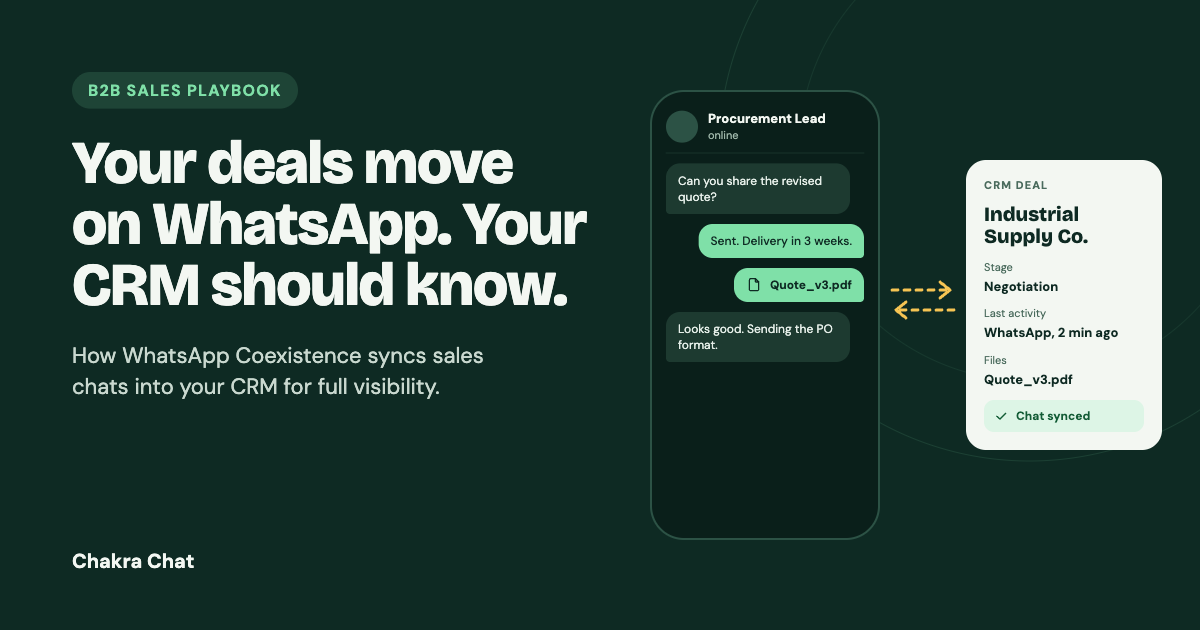
A typical example: an industrial equipment supplier sends a formal proposal by email. The questions, the revised delivery timeline and the final "okay, send the PO format" all happen on WhatsApp over the next two weeks. Email holds the paperwork. WhatsApp holds the decision.
So the channel isn't the problem. The problem is that the tool most teams use, the WhatsApp Business app, was never designed to connect to anything else.
The problem: WhatsApp Business is a silo, and every deal pays for it
In short: the Business app is a great personal tool and a weak organisational one. For a company with 20, 50 or 200 sellers, five costs show up again and again.
1. It doesn't talk to your CRM
Chats live on one phone. They don't reach Salesforce, HubSpot, Zoho or your in-house CRM. The CRM shows emails and logged calls, while the negotiation that actually decided the outcome sits on someone's device. When an account changes hands, the new owner starts from zero.
2. Managers have no oversight
There is no supervisor view of what was promised, to whom, and when. If a seller resigns, the chat history often leaves with them. If a phone is lost without a backup, it may simply be gone. That is a key-person risk sitting inside your revenue engine.
3. CRM records are always a step behind
Good sellers try to copy key points into CRM notes. But what lands there is partial: no full thread, no files, no read status. Fields like "last follow-up" and "next step" depend on someone remembering after a late-night chat. Deals stall quietly, and nobody notices until the quarter closes.
4. Reporting has a blind spot
You can measure email opens and call duration. On WhatsApp you can't see response times, chats waiting for a reply, or prospects who read your message and went quiet. Forecasts are built on what the CRM can see, which is the less important half.
5. It doesn't scale safely, and compliance is hard to prove
- Broadcast lists cap at 256 contacts and only reach people who saved your number.
- Messaging many unsaved contacts quickly can lead to restrictions or bans, with no warning dashboard.
- There is no opt-in record, retention control or audit trail. That is uncomfortable when a customer raises a GDPR or DPDP request, or when your own buyer's procurement team sends a security questionnaire.
Add it up: the channel your sellers rely on most is the one your revenue team can't manage, measure or scale.
The turnaround: what WhatsApp Coexistence changes
In short: Coexistence is Meta's feature that lets one phone number run on the WhatsApp Business app and the WhatsApp Business Platform (Cloud API) at the same time.
For a sales team, that means three things:
- Sellers keep the app they know. Same number, same chats, same habits. The app stays the primary device.
- The same number is now connected to systems. One-to-one conversations can flow into a team inbox, a CRM, bots and reports.
- You start warm, not cold. Up to 6 months of chat history syncs at setup, so the context behind current deals comes with it.
What syncs and what doesn't
| Item | Syncs to the API and Chakra? |
|---|---|
| One-to-one chats (6 months at setup, then live) | Yes |
| Media shared in one-to-one chats | Yes |
| Message status (delivered, read) | Yes |
| Group chats | No, stay on the app |
| Voice and video calls made on the app | No, stay on the app |
| Status updates | No, stay on the app |
Look at the "Yes" rows: that is most of how a deal actually moves forward. Conversations, quotes, files and reply status are now reachable by your systems.
On its own, though, Coexistence is plumbing. Raw API access doesn't give a sales manager a dashboard or a CRM a usable record. You need a layer on top that turns it into a working sales process.
How it works with Chakra: WhatsApp as part of your sales stack
In short: same sellers, same number. With Coexistence enabled through Chakra, the conversations become visible, connected to your CRM and measurable.
1. One shared team inbox
Every chat on the connected number flows into Chakra's shared inbox. Sellers can keep replying from the app or work from the inbox (web, or the iOS and Android app). Either way, the thread no longer lives only on one device. Chats can be assigned, reassigned and picked up by the right person.
2. Access that matches your org chart
Role-based access keeps visibility useful rather than chaotic:
- Sellers see their own conversations.
- Team leads see their team's chats and can step in or reassign.
- Admins see and configure everything.
When someone leaves, you remove their access. The conversations stay with the company.
3. Two-way CRM sync
This is the part RevOps teams care about most.
- WhatsApp to CRM: chat history, media, message status and chat state updates are pushed to the CRM record through APIs and webhooks. "Last activity" finally reflects reality.
- CRM to WhatsApp: CRM events trigger WhatsApp messages. For example, when a quotation is updated in the CRM, the prospect automatically receives the new quote as an approved template message with the PDF attached. Stage changes, meeting bookings and renewal dates can trigger follow-ups the same way.
- Contacts from your CRM: onboard contacts through Chakra's API connector instead of exporting and importing spreadsheets. Your CRM stays the source of truth.
4. Follow-ups that don't risk your number
A quick rule every sales ops team should know: you can reply freely within 24 hours of a prospect's last message. After that window, which is how most B2B follow-ups work, you send a Meta-approved template.
Chakra gives you a central template library (quotes, follow-ups, meeting recaps, document sharing), support for messaging new contacts who have opted in, and messaging limits tied to your quality rating. Send relevant, wanted messages and those limits grow. It's a system you can plan around.
5. Campaigns you can measure
Run broadcast or workflow campaigns to a CRM segment, such as a webinar invite or a renewal offer. Then track each contact as delivered, read or clicked, and set the next step automatically. A contact who clicked but didn't reply can become a same-day task for the account owner.
6. Reporting managers will actually open
- Response time by seller and team
- Open chats and chats waiting on your reply
- Closed chats over any period
Deal reviews stop being guesswork and start being a quick read.
7. Chatbots and AI agents per number
Configure a chatbot or AI agent on each number. A new inbound lead can get a short qualification flow, with answers written back to the CRM. After a quote goes out, a bot can ask how the pricing landed and log the reply. When the conversation needs judgement, it hands over to a person in the same thread.
8. The practical extras
- Quick replies for standard answers.
- Multiple numbers on one platform (sales, marketing, support).
- No markup on template messages: they are billed at Meta's rates, paid directly to Meta. See current pricing.
- Setup assistance and ongoing support for the rollout.
- Compliance support: opt-in based messaging, approved templates, audit trails and admin controls help you respond to GDPR and DPDP requests.
What this looks like in different B2B industries
In short: the pattern is the same everywhere. WhatsApp carries the conversation, the CRM carries the record, and Coexistence keeps them in step.
| Industry | Where WhatsApp drives the deal | What the CRM connection adds |
|---|---|---|
| Manufacturing and industrial supply | Quote revisions, spec clarifications, delivery timelines with distributors and buyers | Updated quote in CRM goes out on WhatsApp automatically; every revision is logged on the deal |
| B2B SaaS and IT services | Demo follow-ups, pricing questions, procurement nudges | Read-but-no-reply chats surface in reports; renewal dates trigger timely check-ins |
| Commercial real estate | Site visit scheduling, floor plans, negotiation on terms | Brochures and visit confirmations tied to the lead record; managers see every active negotiation |
| Education and corporate training | Enquiries from HR and L&D teams, proposal follow-ups, batch confirmations | Inbound leads qualified by a bot and created in the CRM with source tracking |
| Logistics and freight | Rate requests, shipment updates, contract renewals | Rate cards sent from templates; account history survives when the account manager changes |
Limitations to plan for, and best practices
In short: Coexistence covers most of the sales workflow, not all of it. None of the gaps below is a dealbreaker, but each needs an owner.
| Limitation | What it means | Best practice |
|---|---|---|
| Group chats don't sync | Customer or deal-room groups on the app won't appear in Chakra or the CRM | Keep decisions and commitments in one-to-one chats; treat groups as coordination, not the record |
| App calls aren't logged | Voice and video calls made from the Business app stay on the phone | Log the call outcome in the CRM after each call; the chat around the call is still synced |
| The app must stay healthy | The phone must stay installed, logged in and come online regularly, or the connection can break | Name one admin owner and run a weekly check: app online, connected, updated |
| Templates are managed centrally | Sellers can't write their own outbound copy after the 24-hour window | Assign a template owner, build a core library early and allow time for Meta approval |
If calls or groups are central to how your team sells, ask about Chakra's WhatsApp Calling API and Groups API, which run on the API side rather than the app.
Before and after: what you actually gain
| Area | Business app alone | App + Coexistence with Chakra |
|---|---|---|
| Visibility | One phone | Shared team inbox with role-based access |
| CRM | Not connected | Two-way sync of chats, media, status and triggers |
| History | Lost with the device or the employee | 6-month backfill plus live sync |
| Follow-ups outside 24 hours | Risky, manual | Approved templates from a shared library |
| Outbound scale | 256-contact broadcasts, ban risk | Quality-based messaging limits that grow |
| Campaigns | Unmeasured | Delivered, read and clicked tracking with next actions |
| Reporting | None | Response time, open, pending and closed chats |
| Automation | None | Chatbots and AI agents per number, CRM triggers |
| Compliance | Manual | Opt-in, templates, audit trails, admin controls |
Two more benefits worth calling out: you can connect and disconnect Coexistence cleanly, so it isn't a one-way migration. And because you're on Meta's official platform, your number's health is something you can monitor rather than guess.
How to get started with Chakra
In short: setup is a short sequence, not a long IT project, and Chakra's team helps along the way.
- Check the basics: a WhatsApp Business app number, a verified Meta Business portfolio, admin access to your CRM, and one person who will own the app device.
- Create your Chakra account using the All-in-One Account Setup Guide.
- Connect your number with Coexistence. The app stays primary and the API side switches on behind it.
- Connect your CRM through the API connector. Map fields and set up both directions: chats into the CRM, CRM events out to WhatsApp.
- Build your template library for quotes, follow-ups and recaps, and submit for approval.
- Set roles and teams so visibility matches your structure.
- Turn on reporting and bots, then run a first campaign to a small test segment.
One tip that makes the rollout stick: record your baseline first. Measure response time, follow-up adherence and how complete your CRM records are today, then compare after 30 days.
Frequently asked questions
Can I connect the WhatsApp Business app to my CRM? Not directly. The app has no CRM integration. With WhatsApp Coexistence, the same number also runs on the WhatsApp Business Platform, and a tool like Chakra syncs those chats to your CRM.
What is WhatsApp Coexistence? It is a Meta feature that lets one number work on the WhatsApp Business app and the WhatsApp Business Platform (API) at the same time, so your team keeps the app while conversations also reach your business systems.
Will my sellers lose their existing chats? No. Chats stay on the app, and up to 6 months of one-to-one chat history syncs to the platform at setup.
Which CRMs can Chakra sync with? Chakra connects through APIs and webhooks, so it can work with common CRMs and in-house systems. Check with the Chakra team for your specific CRM.
Do group chats and calls sync to the CRM? No. Group chats, app calls and status updates stay on the app. One-to-one chats, media and message status do sync.
Is there a markup on WhatsApp message charges? Not with Chakra. Template messages are billed at Meta's rates and paid directly to Meta.
Can we disconnect Coexistence later? Yes. The number can be disconnected from the platform, and the app keeps working as before.
Summing it up
Email got tracked. Calls got tracked. WhatsApp, the channel your B2B prospects actually reply on, stayed outside the system. That left your CRM telling only half the story of your pipeline.
Coexistence changes that. With your number running through Chakra, sellers keep the app they rely on, the CRM reflects what really happened, and managers get oversight, reporting and room to scale. Groups and app calls still stay on the phone, so plan for them and move forward.
The teams that connect the channel buyers use will forecast better than the teams rebuilding deals from screenshots.
Ready to bring your team's WhatsApp into your CRM? Start with the setup guide or talk to the Chakra team about a rollout plan.