
By Ryan
Published on Nov 17, 2026
How to Find a Verified WhatsApp Tech Partner Using Meta's Partner Showcase
Many providers claim to be official WhatsApp partners, but only Meta can confirm it. Learn the difference between a Tech Provider and a Solution Partner, how to search Meta’s Partner Showcase step by step, what a profile shows, and how to choose the right partner.
Quick answer
- Meta lists its recognised WhatsApp messaging partners in the Partner Showcase: business.facebook.com/messaging/partner-showcase
- Search by partner name, open the profile, and check the product type, key capabilities and demo.
- If a company says it is a Meta partner but is not in the Showcase, ask them to explain.
- The old Meta partner directory page no longer works, so use the Showcase instead.
Plenty of WhatsApp providers say they are "official" or "Meta approved." Some are. Some are not. This guide shows you how to check in a few minutes, using Meta's own tool.
What is the Meta Partner Showcase?
Meta describes it as a place where Meta Business Partners provide messaging-based solutions to help you grow your business with WhatsApp. These partners are recognised by Meta for their proficiency and expertise in delivering WhatsApp solutions.
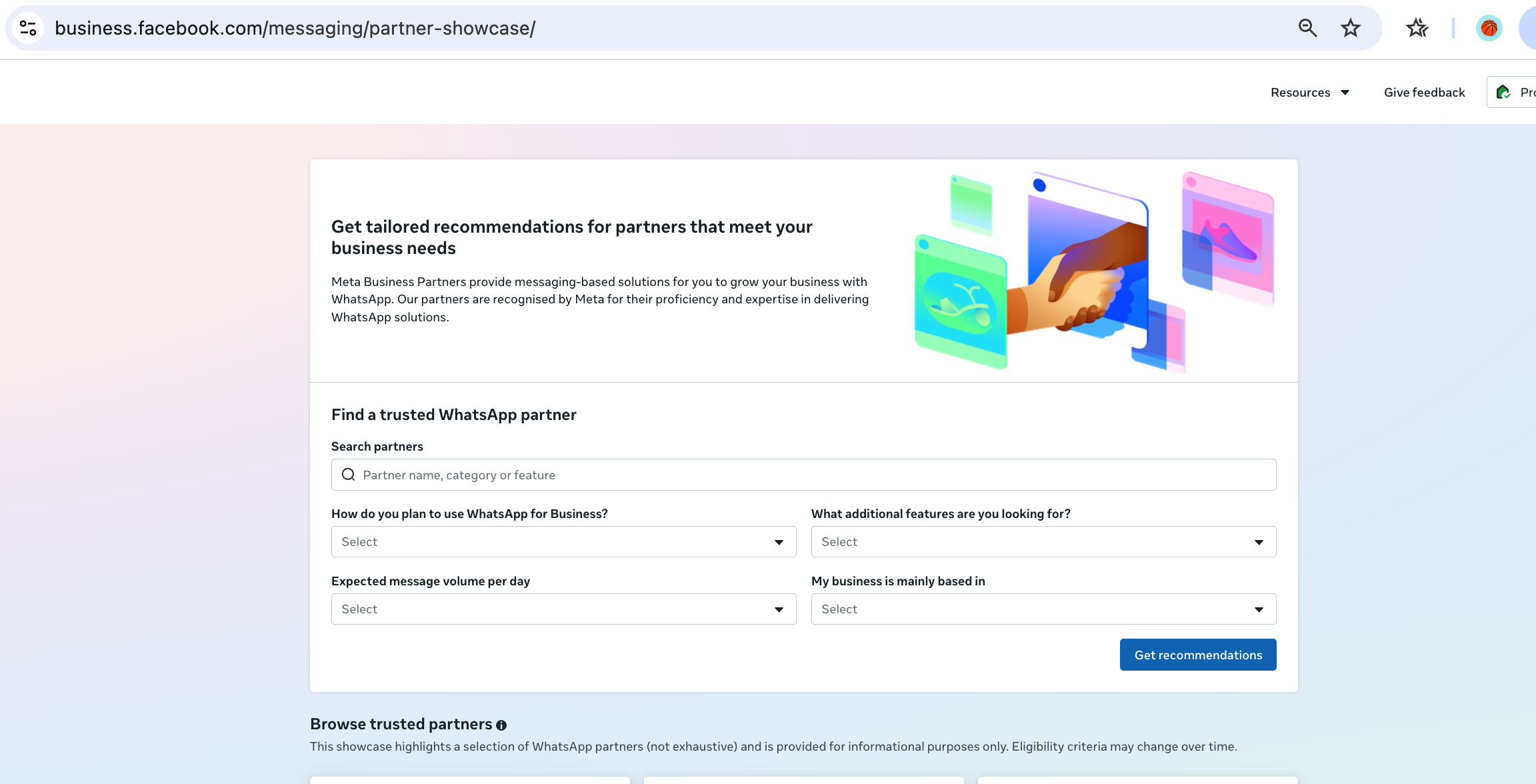
In simple terms:
- It is a customer-facing directory run by Meta
- It lists partners that offer WhatsApp solutions
- It helps you find a partner that fits your business needs
Meta's developer documentation also points non-developers here: "View the Partner Showcase to find a partner tailored to fit your business needs."
Tech Provider vs Solution Partner: what is the difference?
You will see both terms. They are related but not identical.
Tech Provider
- A company that builds software on the WhatsApp Business Platform and offers it to its own clients
- Meta says a Tech Provider can independently provide WhatsApp messaging services to the clients it has onboarded
- To become one, a company must complete business verification and pass App Review with Meta
- Typically onboards customers through Embedded Signup
- Often a software company, such as a CRM, helpdesk or marketing tool
Solution Partner
- Meta describes Solution Partners as Meta Business Partners that provide WhatsApp Business Platform services to client businesses
- Often what people call a BSP (Business Solution Provider)
- A Tech Provider can also choose to work together with a Solution Partner to serve clients
| Tech Provider | Solution Partner | |
|---|---|---|
| Role | Builds and offers WhatsApp software to clients | Provides WhatsApp Business Platform services to clients |
| Meta requirement | Business verification and App Review | Recognised as a Meta Business Partner |
| Onboarding | Embedded Signup flow | Varies by partner |
| Can work with the other? | Yes, jointly with a Solution Partner | Yes |
What this means for you: as a business buyer, you do not need to decide between the two labels. You need a partner that is recognised by Meta, fits your use case, and supports you after setup.
How to find a verified partner: step by step
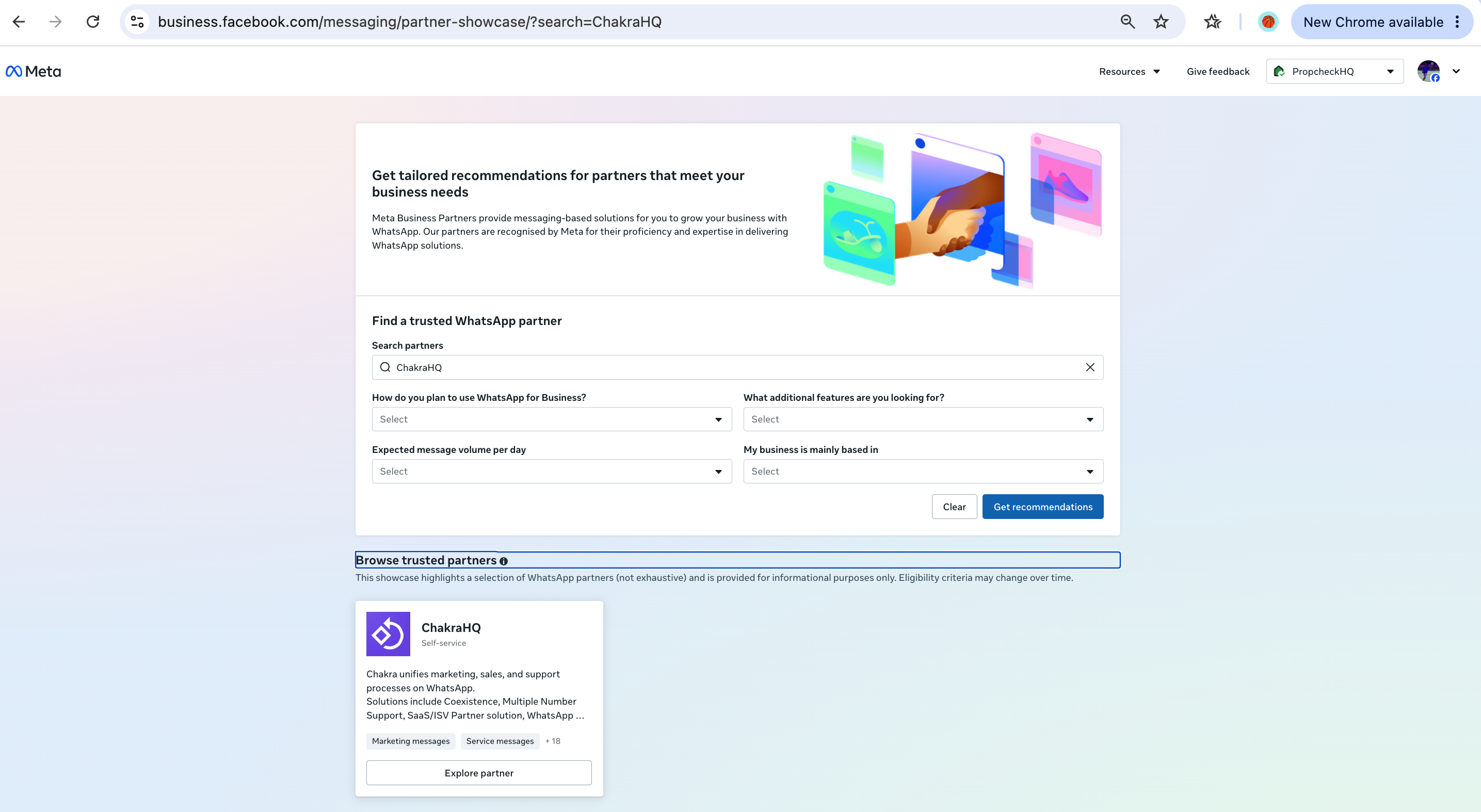
- Open the Partner Showcase at business.facebook.com/messaging/partner-showcase.
- Search the partner's name in the search bar.
- Check the results. If the company appears, it is listed by Meta.
- Click Explore partner to open its profile.
- Read the profile details (see the next section).
- Visit the partner's site from the profile link and compare it with what they told you.
- Note the date you checked. Partner status can change over time.
Not in the list?
- Ask the company which partner program they belong to
- Ask who the legal entity is that will sign your contract
- Ask whether they work through another listed partner
- Be careful if all they can show is a logo or an old screenshot
What details can you see on a partner's profile?
Profiles can differ, but the key attributes to look at are:
- Product type: the kind of solution, for example a messaging platform
- Key capabilities: what the product can do, such as campaigns, chatbots, inbox or integrations
- Product demo: a video or walkthrough so you can see the product
- Link to the partner's website: a button such as "Try [partner name]" takes you to their site
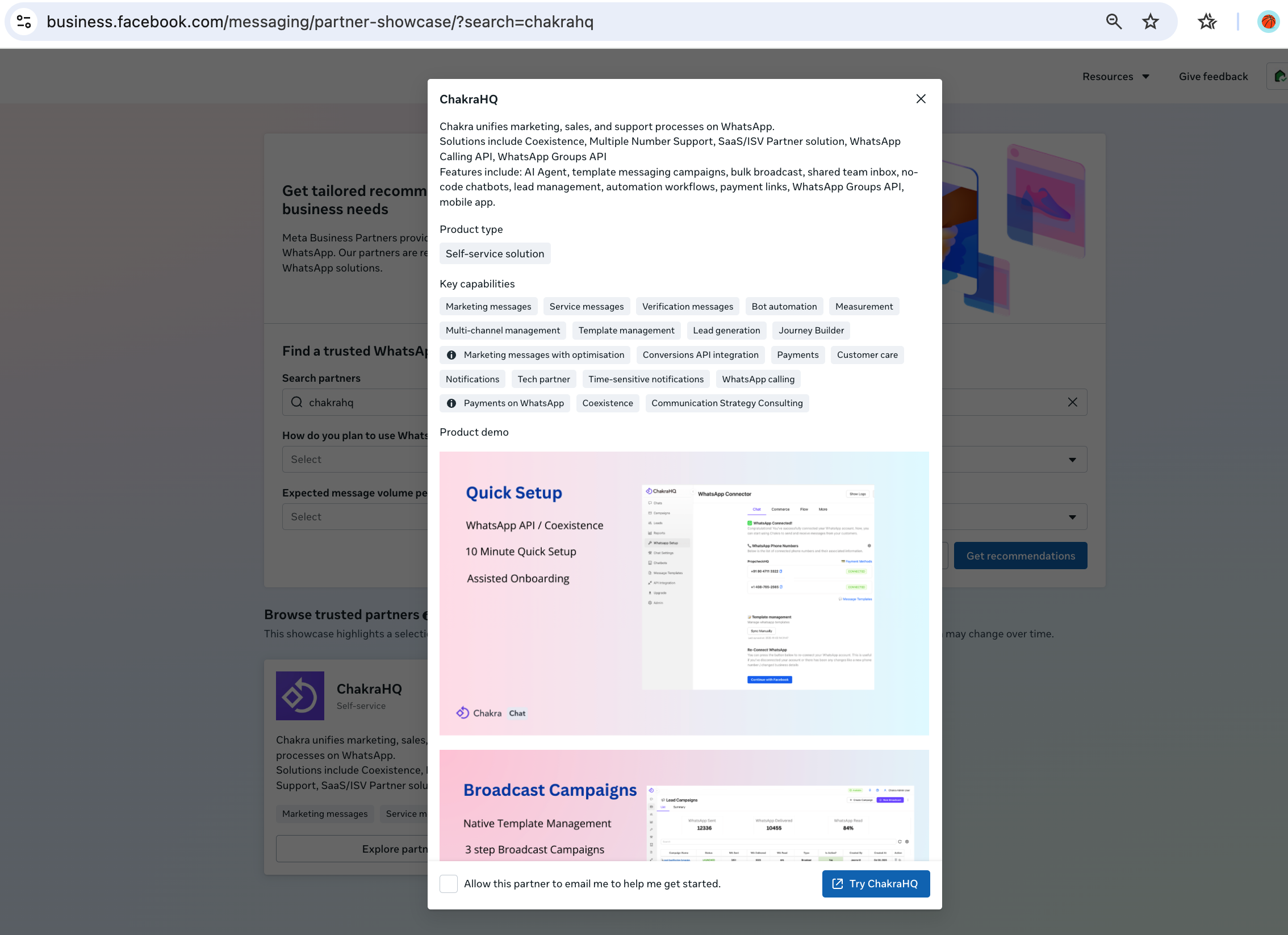
Some profiles may also include a short description and contact options, depending on what each partner has filled in.
Tip: Treat the profile as a starting point and confirm details on a demo call.
Sample search: finding ChakraHQ
Here is how a real search looks:
- Open the Partner Showcase.
- Type ChakraHQ in the search partner bar.
- ChakraHQ appears in the search results.
- Click Explore partner.
- On the profile, check the product type, key capabilities and product demo.
- Click Try ChakraHQ to go to the Chakra website.
- Alternatively, directly go to the partner directly partner listing url - https://business.facebook.com/messaging/partner-showcase/?search=ChakraHQ
Use the same steps for any provider you are considering. It takes about two minutes.
Is the Showcase list verified and up to date?
Verified: The Showcase is Meta's own directory, and Meta says the partners are recognised for their expertise in WhatsApp solutions. That makes it a stronger check than a logo on a website.
Up to date: Be a little careful here.
- Meta has not published how often the list is refreshed, as far as we could find
- Profile text is mostly written by the partners themselves
- Partner status can change, so a screenshot from last year is not proof today
- The old Meta partner directory page is no longer functional, so older links and articles may point to a dead page
Good habit: check the Showcase on the day you decide, and ask the provider to confirm their current partner status in writing.
Benefits of choosing a Meta-recognised partner
Working with a partner that Meta recognises can help you in several ways:
- Trust. Meta has checked the company, which lowers the risk of dealing with an unknown provider.
- Proper onboarding. Partners use Meta's supported methods, such as Embedded Signup, and set up your business portfolio, WhatsApp Business Account, phone number and templates correctly.
- Access to new features. Partners work closely with Meta and can often offer new WhatsApp Business Platform features sooner.
- Support. Meta says confirmed Tech Providers have access to all support channels.
- Compliance guidance. Good partners help you handle opt-ins, templates and quality ratings.
A partner badge does not guarantee approvals, delivery or results. Meta still reviews templates and accounts on their own merits.
How to choose the right partner
Being listed is the first filter. Next, compare what each partner offers.
Ask these questions:
- Does it fit my use case? Support, sales, campaigns, payments or all of these?
- Who owns the WhatsApp Business Account and number? It should be you.
- Can I export my data and leave easily?
- What is the pricing? Look for a clear split between Meta's charges and the provider's fee.
- Is there a team inbox and automation?
- What support do I get, and in which hours?
- Can I keep my WhatsApp Business app number? Ask about Coexistence, which lets you use the app and the API together. See how Coexistence works on Chakra Chat.
- Can I try it first? A free trial or demo is a good sign.
Red flags:
- They cannot say clearly which partner program they belong to
- They ask you to use a personal account or unofficial automation
- They hide pricing or API details until after you pay
- They will not explain who owns your number and templates
FAQs
What is the Meta Partner Showcase? It is Meta's customer-facing directory of Meta Business Partners that provide messaging solutions for WhatsApp.
What is the difference between a Tech Provider and a Solution Partner? A Tech Provider builds software on the WhatsApp Business Platform and serves its own onboarded clients. A Solution Partner is a Meta Business Partner that provides WhatsApp Business Platform services to client businesses. They can also work together.
Is the old Meta partner directory still available? The old directory page no longer works. Use the Partner Showcase instead.
How do I know a partner is really recognised by Meta? Search for them in the Showcase. If they are listed, you can open their profile. If not, ask them to explain their status.
Does a partner badge guarantee message approvals? No. Meta still reviews templates and accounts, and partner status does not override those checks.
Can I switch partners later? Meta supports migration between providers in many cases, but it depends on how your account was set up. Ask before you sign.
Final thoughts
Your conversations, templates and number history live with your partner, so choose carefully. Start with the Partner Showcase, confirm the listing, then compare features, pricing and support.
References
- Meta Partner Showcase
- Meta Business Partners program
- Meta for Developers: Become a Tech Provider
- Meta for Developers: WhatsApp Business Platform overview