
By Avi
Published on Mar 10, 2026
How to Track WhatsApp Conversions from Google, LinkedIn & TikTok Ads (No Code)
Running ads on Google, LinkedIn, Youtube, or TikTok and sending traffic to WhatsApp? Meta's deep link limitation silently drops your UTM data. Here's how Chakra Chat uses unique reference codes to restore full conversion tracking - no code needed.
Why Tracking Ad Conversions Matters
Every rupee you spend on advertising needs to be accountable. Whether you're running campaigns on Google, LinkedIn, YouTube, or any other platform, understanding which ads are driving actual customer conversations - and eventually revenue - is the backbone of smart marketing.
Ad conversion tracking helps you answer critical questions:
- Which campaigns are generating the most leads?
- What is the cost per conversation or acquisition from each channel?
- Which ad creatives, audiences, or keywords are performing best?
- Where should you increase (or cut) your ad budget?
Without this data, you're essentially flying blind. You may be pouring budget into campaigns that look good on impressions and clicks, but aren't driving real business conversations. Conversion tracking connects the dots between ad spend and business outcomes, enabling you to optimize with confidence.
💡For businesses using WhatsApp as their primary customer engagement channel, this becomes even more critical - WhatsApp often sits at the top of the conversion funnel, and knowing which ad drove a customer to initiate a chat can mean the difference between a 2x and a 10x return on ad spend.
Challenge: Hard to track Non-Meta Ads
WhatsApp offers a beautifully simple way for customers to reach your business - a tap on a button, and the conversation begins. But that simplicity hides a significant tracking gap for marketers running ads outside of Meta's ecosystem (Google Ads, LinkedIn, YouTube, programmatic platforms, etc.).
Here's the core problem: the only way to open a WhatsApp conversation from a web or mobile experience is via WhatsApp's own link formats - wa.me/ links or api.whatsapp.com links. These are standardized deep links that open the WhatsApp app with a pre-filled message.
The issue is that Meta does not pass UTM parameters or any custom query parameters through these WhatsApp links. When a customer arrives at your ad, clicks the WhatsApp button, and starts a chat, all of the UTM data you carefully attached to your ad URL - utm_source, utm_medium, utm_campaign, ad_id, and more - is silently dropped by the time the conversation reaches your inbox.
This is a platform-level limitation from Meta's side, not something that can be resolved through typical workarounds like URL builders or redirect tracking. The moment the deep link hands off to the WhatsApp app, the UTM context is lost.
The result? You see dozens of new WhatsApp conversations in your inbox, but you have no reliable way to know:
- Whether they came from your Google Search campaign or your YouTube video ad
- Which ad group or keyword triggered the click
- Which creative variant the customer saw before reaching out
- What the customer's journey looked like before they messaged you
This is a known and frustrating gap for performance marketers - and it's why Chakra Chat has built a purpose-built solution to solve it.
Chakra Chat's Solution: UTM Tracking
Chakra Chat has developed an intelligent workaround that circumvents Meta's deep link limitation entirely - without relying on URL parameters at all. The example uses a TikTok ads example here.
How It Works
Instead of trying to pass UTM data through the WhatsApp link (which Meta blocks), Chakra Chat embeds the tracking information directly into the pre-filled message body itself, using a dynamically generated unique reference code.
Here's the mechanism step by step:
1. You configure a WhatsApp chat URL with UTM parameters
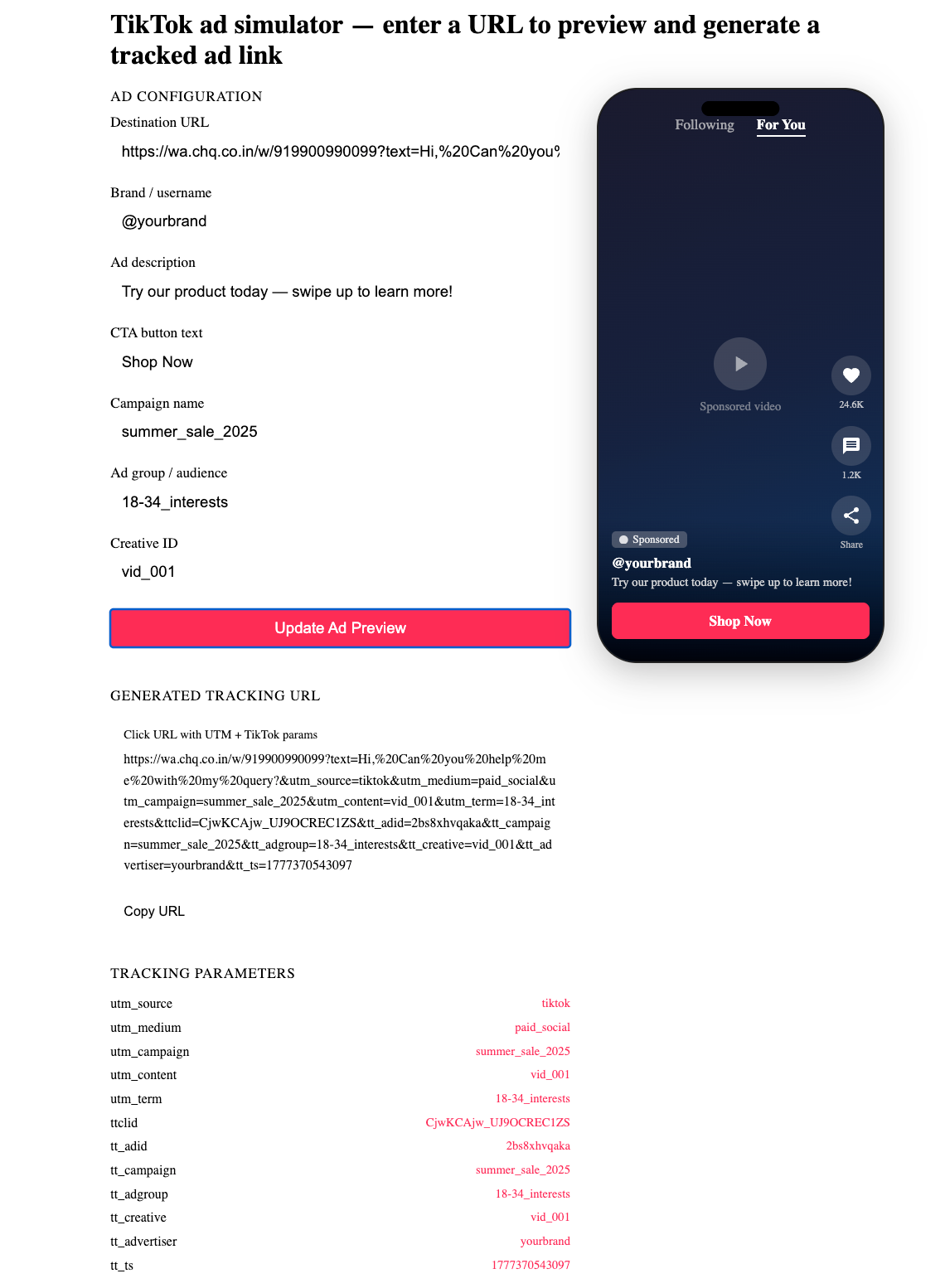
You set up your WhatsApp link in Chakra Chat, attaching standard UTM parameters to the destination URL - just as you would for any landing page. For example:
https://app.chakrahq.com/chat/your-business?utm_source=google&utm_medium=cpc&utm_campaign=summer-sale&ad_id=12345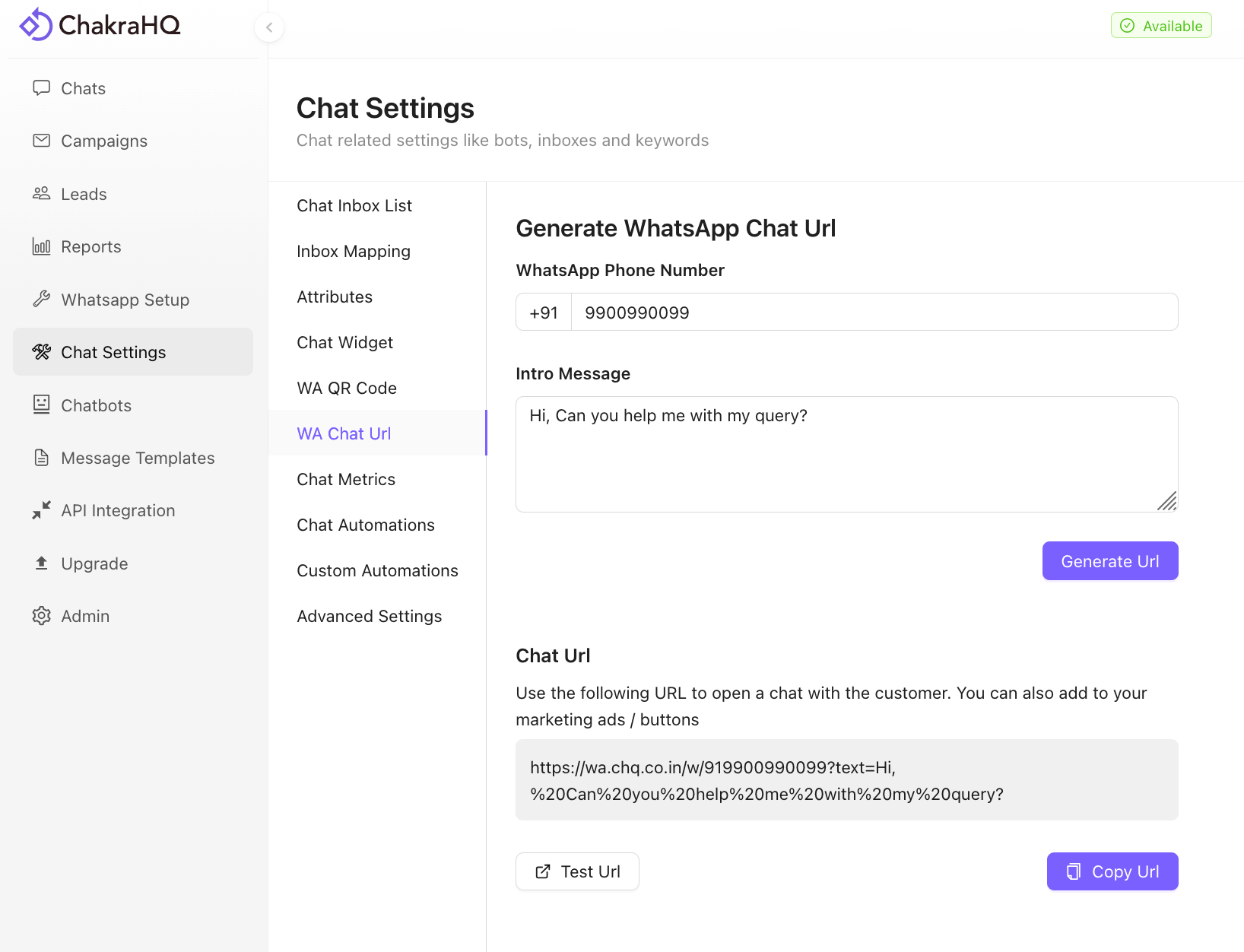
2. Chakra Chat generates a unique Ref ID for each visitor
When a customer clicks your ad and arrives at the Chakra Chat link, Chakra's system reads the UTM parameters from the URL and maps them to a unique, session-level reference code - say, ABC123 for one visitor and XYZ789 for another.
3. The Ref ID is appended to the WhatsApp pre-filled message
The customer's WhatsApp app opens with a pre-filled message that includes this Ref ID. For example:
"Tell me more about your products. Ref ID: ABC123"
Every customer gets a different Ref ID embedded in their message, making each conversation individually traceable back to its origin ad.
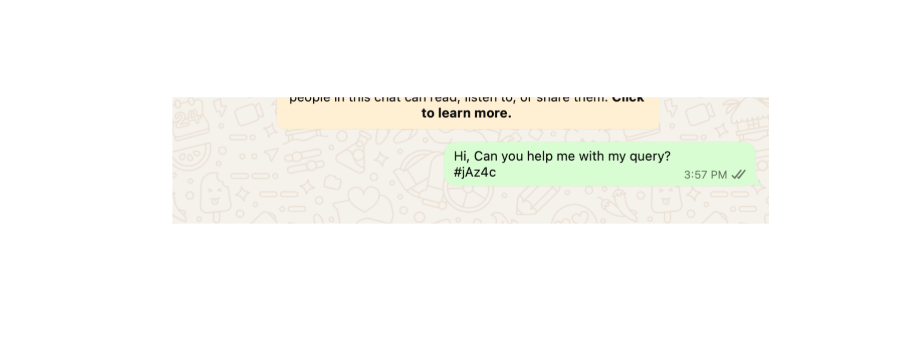
4. When the customer sends the message, Chakra traces it back
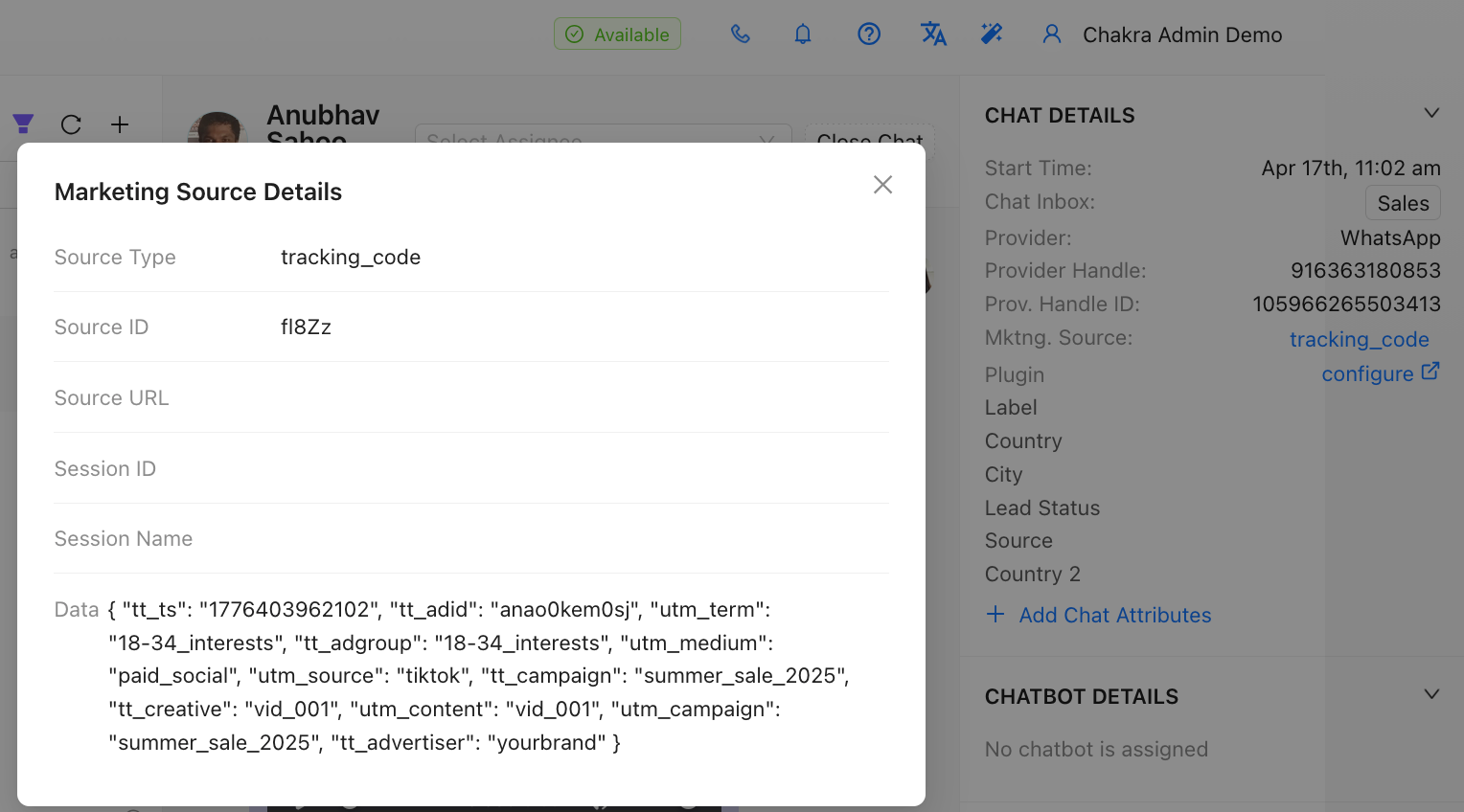
The moment the customer hits send, Chakra Chat's backend matches the Ref ID to the stored UTM and ad data, and automatically populates the Marketing Source field in the conversation with the full attribution details - including utm_source, utm_medium, utm_campaign, ad_id, utm_content, ad_group, and any other parameters passed in the original URL.
Your team can now see, right in the Chakra Chat inbox, exactly which ad campaign drove that conversation.
A Practical Example
Suppose your intro message is:
"Hi! I'd like to know more about your products."
A customer coming from your Google Search campaign (Campaign: Summer Sale, Ad Group: Shoes) would see:
"Hi! I'd like to know more about your products. Ref ID: ABC123"
A different customer from your YouTube campaign would see:
"Hi! I'd like to know more about your products. Ref ID: XYZ789"
Both Ref IDs are silently mapped on the backend to their respective campaign data, giving you clean, per-conversation attribution - without the customer needing to do anything special.
Important Note on Tracking Accuracy
This solution is robust for the vast majority of customers. However, since the Ref ID lives inside the message body, there is a small edge case: if a customer manually edits or deletes the Ref ID before sending the message, the UTM attribution for that specific conversation will not be captured.
💡In practice, most customers send the pre-filled message as-is, making this a reliable tracking method. The downside in the edge case is limited - only that conversation's UTM data goes unpopulated, and the rest of your tracking continues to work normally.
Setup Guide
Getting started takes just a few minutes. Here's how to configure your WhatsApp chat link for ad tracking:
Step 1: Go to your Chakra Chat settings: https://app.chakrahq.com/admin/chat-settings#whatsapp-link
Step 2: Enter your business WhatsApp phone number.
Step 3: Configure an intro message - this is the pre-filled text your customers will see in their WhatsApp compose box when they click the ad. Keep it conversational and relevant to the campaign (e.g., "I'd like to know more about your summer sale products.").
Step 4: Click Generate Chat URL. Chakra Chat will create a shareable link that is UTM-tracking enabled.
Step 5: Append your UTM parameters to the generated URL and use it as the destination URL in your ad platform (Google Ads, LinkedIn, YouTube, etc.):
https://[your-chakra-chat-url]?utm_source=google&utm_medium=cpc&utm_campaign=summer-sale&utm_content=ad-variant-a&ad_id=12345&ad_group=shoesThat's it. From this point on, every conversation initiated via that link will carry its ad attribution directly into your Chakra Chat inbox.
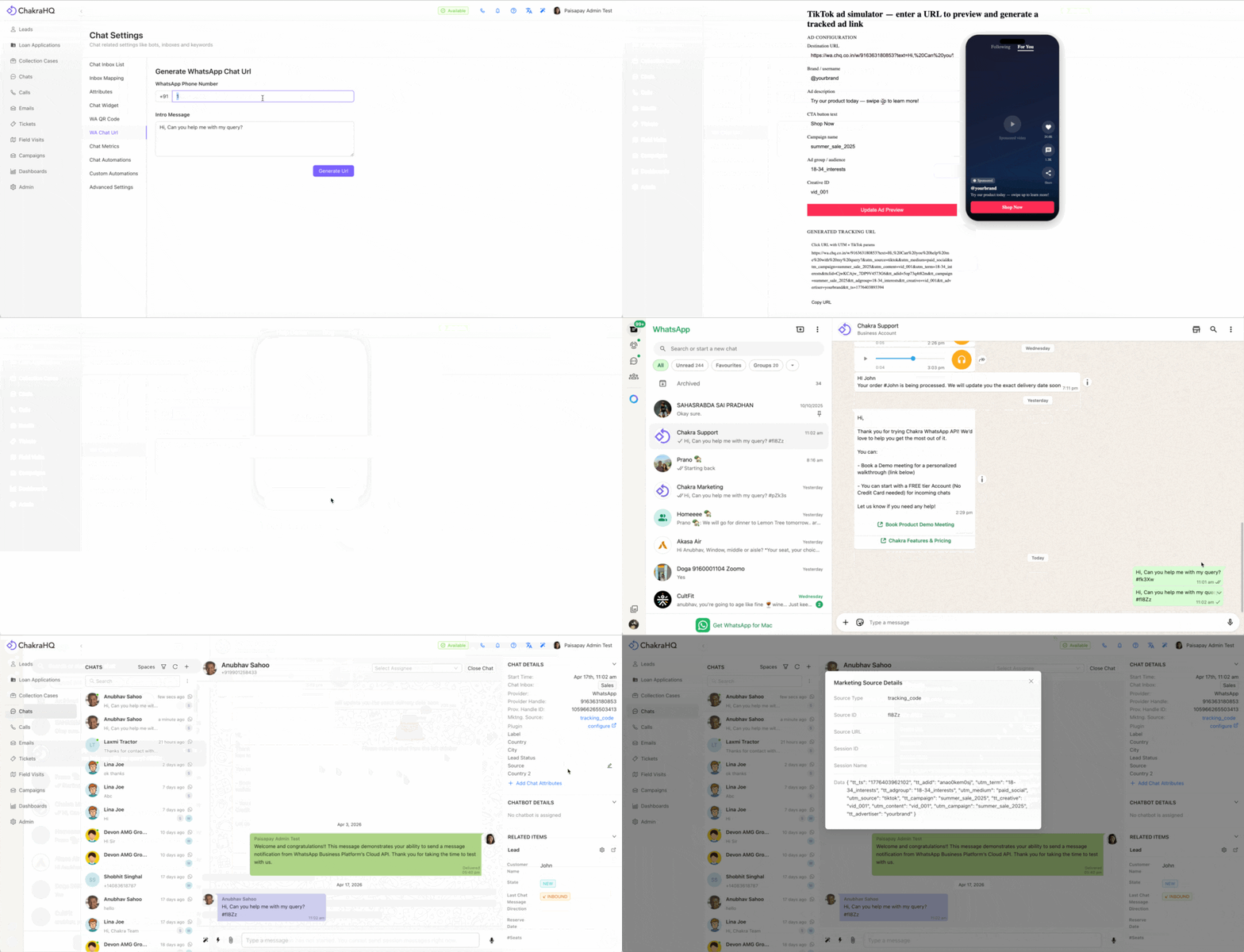
How Ad Conversion Tracking Works
Here's what happens from click to conversation:
- Customer clicks your ad on Google, LinkedIn, YouTube, TikTok, or any platform
- The ad destination URL (your Chakra Chat link with UTM parameters) loads in the browser
- Chakra Chat reads the UTM parameters, generates a unique Ref ID for this visitor, and opens WhatsApp with the pre-filled message + Ref ID embedded
- The customer sends the message to your business number - with the Ref ID intact
- Chakra Chat's backend matches the Ref ID to the stored UTM and ad data
- The Marketing Source field in Chakra Chat is automatically populated with
utm_source,utm_medium,utm_campaign,ad_id,ad_group,utm_content, and any other parameters from the ad URL
Your team sees the full attribution data right alongside the conversation - no extra dashboards, no manual tagging, no guesswork.
Key Benefits of Tracking Ad Conversion
Full-funnel visibility across all ad channels: Whether you're running Google Search, YouTube, LinkedIn, or any other non-Meta platform, Chakra Chat gives you consistent attribution across your entire media mix - not just Meta campaigns.
No developer effort required: The entire setup is done through a simple UI. No code changes, no custom redirects, no third-party tools needed. If you can configure a URL, you can set this up in minutes.
Per-conversation attribution: Unlike aggregate-level tracking, Chakra Chat ties UTM data directly to individual conversations. This means your sales or support team can see, at a glance, which campaign a customer came from - enabling more relevant, context-aware responses.
Works with your existing ad platforms: This solution is compatible with any ad platform that supports custom destination URLs - Google Ads, LinkedIn Ads, YouTube, programmatic display, email campaigns, QR codes, and more.
Actionable data to optimize ad spend: With marketing source data visible inside Chakra Chat, you can measure which campaigns generate not just clicks, but actual conversations and conversions - enabling smarter budget allocation and creative optimization.
Seamless customer experience: The Ref ID is appended subtly to the message body. Most customers won't notice or be confused by it, and it does not interrupt the natural flow of starting a WhatsApp conversation.
Scalable across campaigns: Run multiple campaigns simultaneously, each with their own UTM parameters. Chakra Chat handles the attribution for all of them in parallel - each conversation correctly tagged to its source.
Get Started with Chakra Chat
Chakra Chat is built on the Official WhatsApp Business API and is a certified Meta Business Partner. Beyond ad tracking, it offers a full suite of tools to power your WhatsApp marketing and support - bulk campaigns, chatbot, AI Agents, Shared Team Inbox, AI assist, in-built analytics, and more.
Ready to bring full-funnel visibility to your WhatsApp marketing?