

Export Data
Push data to AWS Kinesis
Sync your CRM data to your Kinesis store automatically
You can use our in built integration with AWS Kinesis to push data to your organization.
Create a new External Data Store
- Go to https://app.chakrahq.com/admin/external-data-stores
- Click the Add button
- Choose KINESIS as the store type and provide an appropriate name like "Kinesis Integration"
- Provide the required details like Stream Name, Region, Key, Secret, etc...
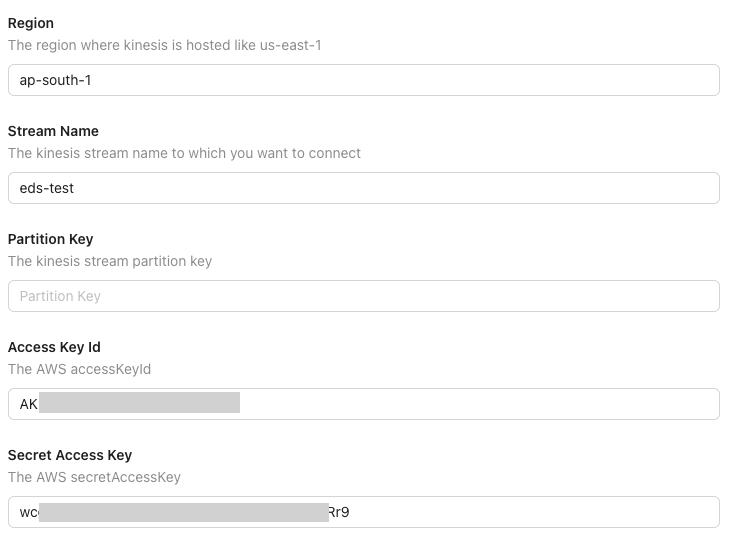
Update the External Data Store Settings
- Go to https://app.chakrahq.com/admin/external-data-stores
- Click the Kinesis external data store from the list
- Here you can update the following parameters of your Kinesis integration
- AWS Region
- Stream Name
- Partition Key (Optional)
- Access Key Id
- Secret Access Key
- Test the configuration
- Save the configuration if the test is susccessful
Test the External Data Store
It is recommended to test the provided Kinesis details after updating the Kinesis configuration. Please run these tests before "Saving" the new config.
- Click on the "Test Connection" button to test wether Chakra Services are able to reach your Kinesis server
- Then click the "Send Test Data" button to send some test data to your Kinesis system.
- If tests are successful then save the store configuration
Create a Lifecycle Rule to push data to this store
- Go to Admin > Lead > Lifecycle Rules
- Create a new rule for lead creation post
- Add a new action to push data to external store
- In the action configuration select the kinesis data store
- Save and activate this rule
- Create more lifecycle rules for other types of lead / task events as required