What Are Chat Triggers in WhatsApp? How to Use Them
Master your business communication with WhatsApp Chat Triggers. Learn how to use auto-replies, keyword triggers, and smart agent assignment to boost productivity and capture every lead with the Chakra Chat API solution.
Businesses are increasingly turning to WhatsApp Business API to engage with their audience as they scale their WhatsApp engagement and with Meta nudging Business app user to the API solution for higher volume usage via accoun restrictions.
With over 3 billion users worldwide, WhatsApp offers a direct, personal channel for interactions. One powerful feature enhancing this is Chat Triggers in WhatsApp, which automate responses and actions based on specific conditions. This article explores what Chat Triggers are, their use cases, advantages, types, best practices, and actionable steps, while highlighting how solutions like Chakra Chat WhatsApp API Solution can help businesses implement them effectively for better customer engagement, auto replies, and agent assignments.
What is a Chat Trigger?
A Chat Trigger in WhatsApp is an automation mechanism that initiates a predefined action or response when certain conditions are met in a conversation. These triggers are part of the WhatsApp Business API, allowing businesses to respond instantly without manual intervention.
For instance, a trigger might activate when a customer sends a specific keyword, starts a new chat, or remains idle for too long.
Unlike basic auto-replies in the standard WhatsApp Business app, Chat Triggers via the API offer advanced customization, integrating with chatbots, CRMs, and workflows. They action to notify your system of events like incoming messages or status changes. This makes them essential for scaling customer support and marketing on WhatsApp.
Use Cases of Chat Triggers
Chat Triggers can be of numerous types and versatile types that can transform how businesses interact on WhatsApp with their customers to drive quicker responses, enabled 24x7 replies and reduce errors by leevraging automation. Here are some common use cases:
- Customer Support Automation: Trigger responses to FAQs, like order tracking or product info, reducing wait times.
- Lead Qualification: When a prospect messages with keywords like "pricing," trigger a chatbot to gather details and qualify leads.
- Appointment Reminders: Send automated reminders triggered by booking confirmations or time-based events.
- Abandoned Cart Recovery: If a user inquires about a product but doesn't complete the purchase, trigger a follow-up message with discounts.
- Onboarding New Customers: Welcome new users with guided flows, such as tutorials or account setup assistance.
- Feedback Collection: After a chat ends, trigger a survey to gather customer satisfaction data.
Advantages of Chat Triggers
Implementing Chat Triggers in WhatsApp brings numerous benefits, making your communication more efficient and customer-centric:
- Increased Productivity: Automate routine tasks, freeing agents to focus on high-value interactions. This can reduce response times by up to 40%, as seen in various messaging app studies.
- Less Human Involvement: Handle simple queries via chatbots, minimizing the need for constant monitoring and reducing operational costs.
- Fewer Missed Opportunities: Triggers ensure no chat goes unanswered, even during off-hours, preventing lost leads or frustrated customers.
- Personalized Engagement: Deliver tailored responses based on user behavior, improving conversion rates and customer loyalty.
- Scalability: Manage high volumes of chats without proportional staff increases, ideal for growing businesses.
- Data Insights: Track trigger activations to analyze customer patterns, refining strategies for better outcomes.
- Compliance and Security: Automated triggers help maintain consistent messaging, adhering to WhatsApp's policies.
Types of Chat Triggers
WhatsApp Business API supports various types of Chat Triggers, each suited to different scenarios. Based on API documentation and automation tools, here are key types:
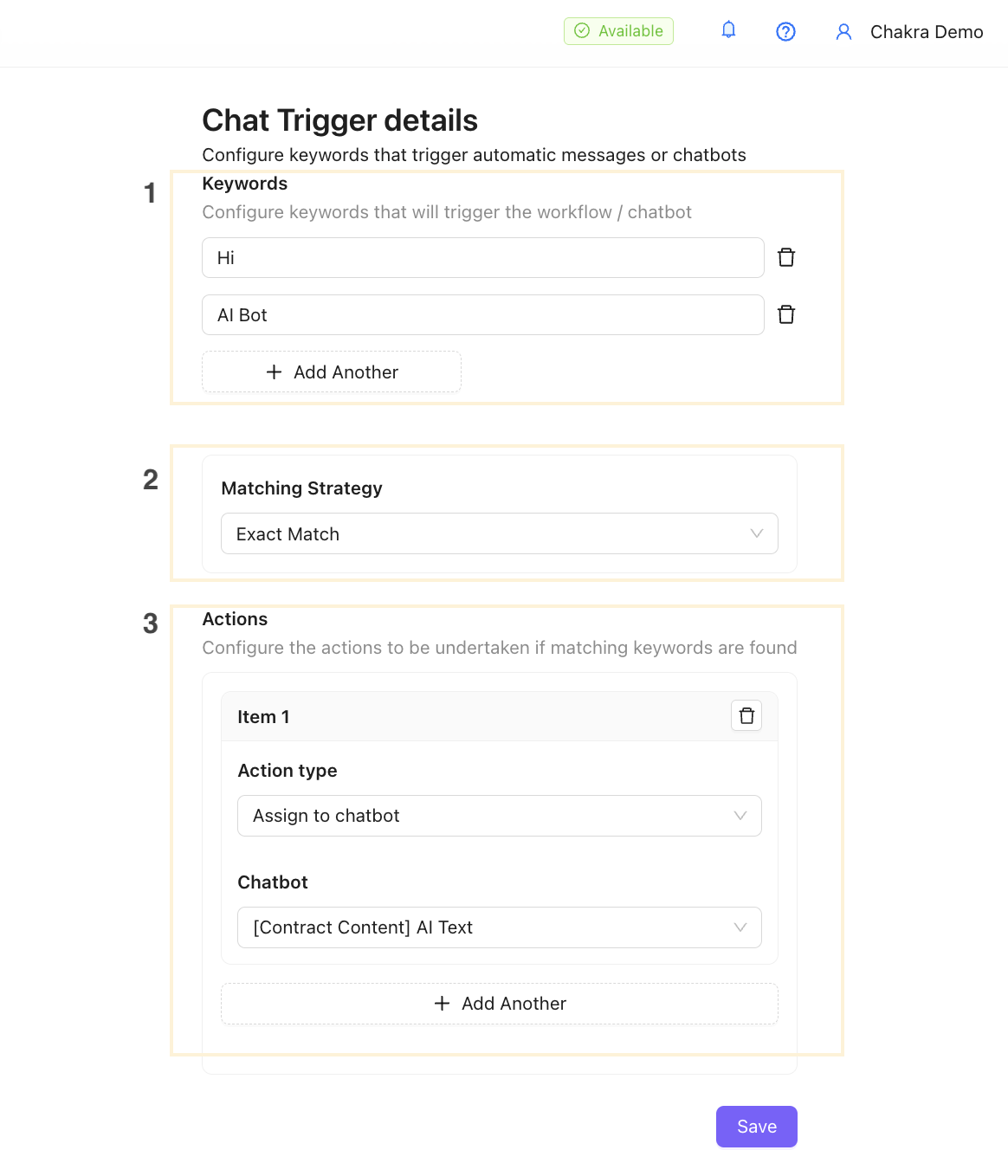
- Keyword-Based Triggers: Activate when a message contains specific words, e.g., "help" assigns the chat to an agent or "chat with human" switches from chatbot to live support.
- Chat Started Triggers: Fire when a new conversation begins, sending welcome messages or icebreakers.
- Chat Ended Triggers: Trigger post-chat actions like sending surveys or closing sessions.
- Chat Session Window About to Close: Remind users before the 24-hour messaging window expires, prompting re-engagement.
- Chat Idle Triggers: Respond if a user is inactive for a set time, e.g., "Still there? How can I assist?"
- Time-Based Triggers: Schedule actions like reminders or follow-ups at specific intervals.
- Event-Based Triggers: Linked to external events, such as order shipments or webhook notifications.
- User Action Triggers: Respond to button clicks, reactions, or unsubscribes.
- Catch-All Triggers: Handle unmatched messages with default responses.
Best Practices to Use Chat Triggers
To maximize the effectiveness of Chat Triggers in WhatsApp, follow these best practices:
- Start Simple: Begin with basic triggers like welcome messages before adding complex ones.
- Obtain Opt-Ins: Always get explicit consent for automated messaging to comply with WhatsApp policies.
- Personalize Responses: Use dynamic placeholders for names or order details to make triggers feel human.
- Test Thoroughly: Simulate scenarios to ensure triggers work as intended without overwhelming users.
- Monitor Performance: Track metrics like response rates and engagement to refine triggers.
- Integrate with Tools: Connect triggers to CRMs or analytics for seamless data flow.
- Provide Escalation Paths: Include options to "assign to agent" for issues bots can't handle.
- Avoid Spam: Limit trigger frequency and offer easy opt-outs to maintain trust.
- Use A/B Testing: Experiment with different trigger messages to find what resonates.
- Stay Compliant: Use approved templates for initial contacts and respect messaging windows.
Types of Actions That Can Be Taken
Once a Chat Trigger activates, various actions can follow to enhance the conversation:
- Assign to Chatbot: Route queries to an AI-powered bot for instant handling.
- Send a Template Message: Use pre-approved templates for notifications like confirmations.
- Close Chatbot Session: End automated flows and notify users.
- Assign to User/Agent: Escalate to a human agent for personalized support, e.g., via "chat with human" keyword.
- Send a Media File/Document: Share quotations, brochures, or images, e.g., when a user requests "need quotation."
- Update Customer Details: Change CRM statuses, like setting a lead to "Not Interested" based on responses.
- Invoke AI Chatbot: Switch to advanced AI if a user asks questions outside standard buttons in a workflow chatbot.
- Send Notifications: Trigger alerts for order updates or reminders.
- Collect Feedback: Launch surveys post-interaction.
- Integrate with External Systems: Update databases or trigger emails via webhooks.
Conclusion
Chat Triggers in WhatsApp are a game-changer for businesses aiming to automate and optimize customer interactions. From boosting productivity to ensuring no chat is missed, they offer a scalable way to engage users effectively. By understanding types, use cases, and best practices, you can harness their full potential.