Duplicate Leads in Your CRM: The Silent Revenue Killer — and How to Stop It
Duplicate leads silently inflate your pipeline, split ownership between reps, and corrupt your forecasts. Learn what causes them, the five types to watch for, and how to resolve them automatically - without any manual cleanup.
When the same prospect appears twice in your pipeline, everything downstream breaks: sales reps step on each other, customers get called twice, and your analytics lie to you. Here's a complete guide to understanding, preventing, and automatically resolving duplicate leads.
What are duplicate leads in a CRM?
A duplicate lead is any record in your CRM that represents the same real-world prospect as another existing record - whether the two records are nearly identical or separated by subtle differences in name spelling, email domain, or contact number.
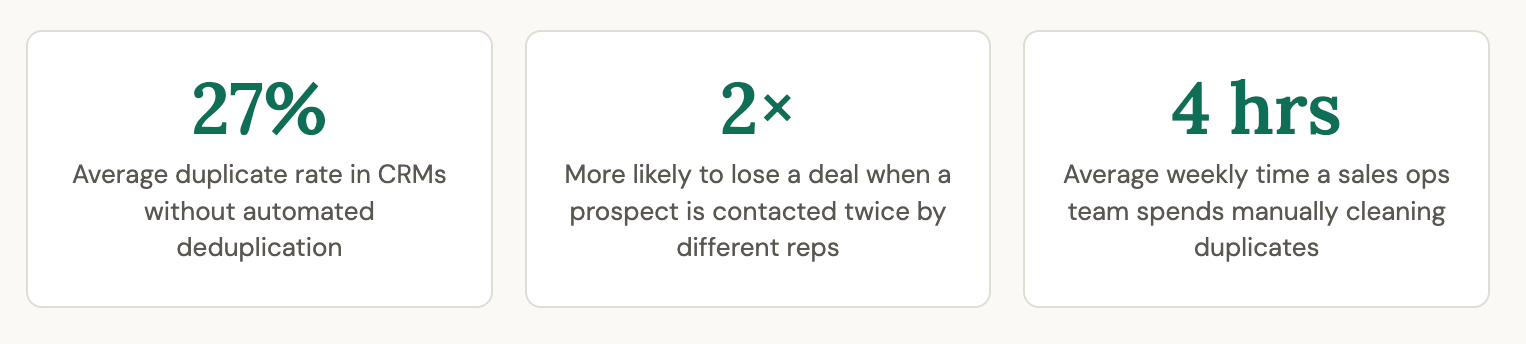
At a surface level, duplicates look like a data hygiene problem. They're not. They are a pipeline integrity problem. Every downstream action your team takes - assigning a rep, scheduling a follow-up, sending a proposal - is compromised when it's based on a fractured view of who that prospect actually is.
Why duplicate leads happen
Duplicates don't arise from carelessness alone. They are a structural outcome of how modern sales and marketing teams generate leads. Here are the most common root causes:
Manual data entry inconsistencies
When SDRs, field sales reps, or marketing coordinators log leads by hand, minor variations are inevitable. "Ravi K." and "Ravi Kumar" are the same person. "Infosys Ltd" and "Infosys Limited" are the same company. Without strict validation, both entries survive as separate records.
Multiple marketing channels feeding one CRM
A prospect discovers your product through a Google Ad, fills out a landing page form, and later books a demo via your website chatbot. Each channel fires its own webhook or form submission into your CRM - three touchpoints, three records, one person. The more channels you run (paid ads, SEO, webinars, events, partnerships, cold outreach), the higher your duplication risk.
Same channel, multiple form fills
A prospect who submitted an enquiry in January and returned to fill out a "Request a demo" form in March may not remember they already exist in your system. Your form doesn't check either. Result: a new lead record is created on top of the old one.
Integrations and CRM migrations
Third-party integrations - marketing automation tools, event platforms, customer support helpdesks - often push contact data independently. When records from HubSpot, Mailchimp, Eventbrite, and Intercom all converge into one CRM without a deduplication layer, collisions are guaranteed. Migrations from legacy CRMs compound the problem.
Lead list imports
Purchasing or importing prospect lists (conference attendees, directory exports, partner leads) is a fast way to introduce bulk duplicates, especially when a contact already exists organically from inbound activity.
Referrals and partner-sourced leads
A partner or reseller submits a lead referral for a prospect who is already deep in your own pipeline. Without cross-checking, your CRM now holds two active records for the same deal - and both reps may believe they own it.
Real-world example: A SaaS company running Google Ads, LinkedIn campaigns, and a referral programme found that 34% of their "new" MQLs were actually existing contacts who had re-engaged through a different channel. Their sales team was unknowingly competing against itself.
What duplicate leads actually cost you
The damage from duplicate leads is felt across every layer of your revenue operation. Here's what breaks when your CRM contains unresolved duplicates:
Conflicting ownership - two reps, one prospect
When the same enquiry is assigned to two different salespeople, both believe they own the relationship. The prospect receives two separate calls, two different pitches, possibly contradictory pricing. This is one of the fastest ways to destroy trust before a deal even begins.
Missed or doubled follow-ups
Rep A marks the original record as "contacted." Rep B's duplicate record still shows "new." Automated workflows may trigger follow-up sequences on both, flooding the prospect's inbox. Alternatively, if one record gets disqualified, the valid record goes cold with no owner.
Corrupted pipeline metrics
Revenue forecasts, conversion rates, average deal size, and source attribution all depend on a clean count of unique leads. If 20% of your pipeline records are duplicates, your funnel is inflated - and every strategic decision made from that data is slightly wrong.
Wasted marketing spend
Retargeting ads, email nurture sequences, and event invitations sent to duplicate records are pure waste. You're paying to reach the same person twice, while simultaneously damaging deliverability and raising unsubscribe rates.
Poor customer experience at scale
Enterprise buyers and high-value prospects are acutely sensitive to operational sloppiness. Receiving two calls from the same company about the same product - within days of each other - signals a broken internal process. It erodes confidence before the relationship has started.
Compliance and data privacy risk
Under GDPR, PDPA, and similar regulations, holding duplicate contact records can complicate consent management. If a prospect submits an opt-out request and only one of their duplicate records is updated, you may inadvertently continue communicating with them - a compliance violation with real consequences.
The five types of duplicate leads
Not all duplicates are created equal. Recognising the type of duplication matters because each type demands a slightly different detection strategy.
Type 1: Exact duplicates
Identical records on every field - same name, same email, same phone. Usually created by form re-submissions or double imports. Easiest to detect and resolve.
Type 2: Partial duplicates
Same person, but small variations: "Anjali Mehta" vs "A. Mehta", work email vs personal email, or +91 prefix present on one record and absent on another.
Type 3: Disguised duplicates
The same individual has used different names or contact details deliberately or incidentally - a nickname vs. formal name, a maiden name vs. married name, or separate phone numbers for different roles.
Type 4: Cross-object duplicates
The same person exists as both a Lead and a Contact, or appears in multiple pipeline stages (e.g., both as an active opportunity and a re-enquiry lead). Common in CRMs with separate Lead and Contact modules.
Type 5: Same company, different person
Two decision-makers from the same organisation - e.g., the CFO and the IT Head - both submit enquiries for the same product. These are technically not duplicates, but if handled independently they risk a disjointed enterprise sales motion.
Bonus: Same person, different channel
How to solve the duplicate lead problem
A robust deduplication strategy works on two fronts simultaneously: preventing new duplicates from entering the system, and cleaning up existing ones. Layer in automation and AI, and you can make deduplication effectively invisible to your team.
Preventive measures
- Real-time duplicate check on form submission before record creation
- Email and phone number uniqueness validation at the CRM entry point
- Standardised field formats (phone number format, company name normalisation)
- Single source of truth for lead ingestion - route all channels through one integration layer
- Lead assignment rules that check for existing records before distributing
- Training SDRs to search before creating new records
Reactive (cleanup) measures
- Scheduled deduplication reports to identify clusters of likely duplicates
- Manual merge workflows with rep confirmation
- Bulk merge tools for post-import cleanup
- Assigning a data steward role responsible for CRM hygiene
- Periodic audits after major campaign pushes or integrations go live
- Customer-initiated self-service: letting prospects update their own records
Automation and AI
- Fuzzy matching algorithms that catch partial duplicates (name variations, phone formats)
- ML-based similarity scoring across multiple fields simultaneously
- Automatic merge with configurable field-level conflict resolution
- Event-triggered deduplication on every new lead entry
- AI enrichment to normalise names, companies, and contact details before matching
- Deduplication rules tuned per channel and per lead source
Real-world scenario - EdTech company
An online learning platform was running simultaneous campaigns across Facebook, Google, and their own website. Their CRM was receiving 300–400 new leads per day. Manual deduplication was simply not possible at that volume.
After implementing automated deduplication with fuzzy name matching and a 90-day lookback window, they discovered that 18% of daily "new" leads were actually re-enquiries from existing pipeline records. More importantly, 7% of those were leads that had previously been marked as "lost" - prospects returning with renewed interest who deserved a different sales approach entirely, not a cold outreach call.
By automatically routing these returning leads to their original rep instead of the inbound queue, the team increased conversion on re-engagement leads by 31%.
How Chakra Sales solves duplicate leads - automatically, without human involvement
Most CRMs put the burden of deduplication on the sales ops team. Chakra Sales takes a different approach: a fully automated, rules-based deduplication engine that triggers on every new lead entry and resolves the conflict before it ever reaches a sales rep's queue.
Here's how the system works, end to end.
Step 1 - Automated configuration
Deduplication rules are set up once by your admin and run silently on every new entry. No manual triggering. No cron jobs. No overnight batch processes.
Rules can be configured per lead source, per pipeline stage, or globally - giving you precise control over which types of entries get checked and how aggressively.
Step 2 - Identifying an existing matching entry
When a new lead enters Chakra Sales, the engine runs a structured lookup against existing records using four configurable parameters:
- Match attributes: Define which fields constitute a "match." You can match on a single unique field (e.g., email address) or require multiple fields to match simultaneously (e.g., phone number AND company name). This prevents false positives - two different people named "Rahul Sharma" at the same company won't automatically be merged.
- Lookback window: Specify the number of days within which to search for an existing matching record. A 30-day window is common for high-velocity inbound teams; a 365-day window works better for enterprise sales with long buying cycles. Contacts who re-engage outside the window get treated as fresh leads.
- Sorting (which match wins): When multiple existing records match the lookup criteria, Chakra Sales sorts candidates by your chosen field (e.g., creation date, last activity date, deal value) and picks the first result. This ensures deterministic, repeatable behaviour - no random selection.
- Sort order and extra conditions: Ascending or descending sort, combined with optional additional conditions (e.g., "only match if the existing record has status = 'Active'" or "only match records owned by a specific team"), gives you surgical precision over which existing record becomes the canonical record.
Step 3 - Actions: what happens when a match is found
Once a match is identified, Chakra Sales executes a pre-configured action. You can define multiple actions in priority order - the first action whose condition is satisfied runs; the rest are skipped. This creates an intelligent decision tree without any code.
Action ordering matters. If you define three actions
- Update existing if Active
- Create new if Lost
- Update and override if re-engaged within 7 days
Chakra Sales evaluates them in order. The first matching condition wins. This means you can handle complex deduplication logic without writing a single line of code.
Step 4 - Field-level parameters for the chosen action
When an action runs, you have fine-grained control over exactly what gets updated on the surviving record:
- Attribute overrides: Specify which individual fields from the new entry should override the existing record, independent of the general action type. For example, always update "Last Enquiry Date" and "Lead Source Channel" from the new entry, but preserve the original "Company Name" and "Deal Value."
- Status: Define what happens to the existing record's status after a merge. Options typically include: keep the existing status, update to the status from the new entry, or force-set to a specific status (e.g., re-open a "Closed" record when a new enquiry arrives).
- Assignee (intelligent ownership resolution): This is where Chakra Sales genuinely differentiates. Instead of a blunt "overwrite the owner" rule, you get four granular options:
- Leave unchanged: The existing record's assigned rep keeps the lead. Best when relationship continuity matters.
- Unassign: if currently assignedStrip ownership and return to unassigned queue. Useful when the original rep is no longer active or the lead requires re-routing.
- Assign to the user who initiated mergingIf the merge was initiated manually by a rep, that rep inherits the record. Rewards proactive data hygiene.
Use assignee from source entry; if not present, leave unchanged. The most nuanced option: if the new (incoming) entry already has an assignee (e.g., from a partner referral or a pre-assigned campaign), use that. If not, default to leaving the existing owner in place. This prevents unnecessary ownership disruption while honouring intentional assignments.
Step 5 - Custom rules and advanced conditions
Beyond the core matching and action engine, Chakra Sales supports additional custom rules that give ops teams the flexibility to handle edge cases without engineering support:
- Conditional logic tied to lead source (e.g., apply stricter matching for paid ad leads vs. organic form fills)
- Pipeline-stage-aware rules (e.g., do not merge if the existing record is in "Negotiation" or later stages)
- Team-scoped deduplication (different rules for enterprise vs. SMB sales teams)
- Custom notification triggers when a duplicate is detected and merged, keeping reps informed without requiring them to manage the process
- Audit log of every merge event - what matched, which action ran, what changed - for compliance and retrospective analysis
How this plays out - PropTech company using Chakra Sales
A property technology platform was receiving leads simultaneously from their website chat widget, a Facebook Lead Ads campaign, and broker partner referrals. Their CRM was accumulating roughly 40–50 duplicates per week before they implemented Chakra Sales' deduplication engine.
They configured three matching rules:
(1) match on email address with a 90-day lookback;
(2) match on phone number with a 60-day lookback for mobile-first prospects who hadn't shared an email;
(3) match on company name + city for B2B property enquiries where contact details differed across decision-makers.
For action logic: if an existing active record matched, update and preserve ownership. If the existing record was marked "lost" more than 30 days ago, reopen it with "re-engaged" status and assign to the user who handles revival leads. If no match, create fresh.
Three weeks after go-live, duplicate creation dropped by 94%. Their pipeline count became accurate for the first time. Revenue forecasting, previously off by ~20% due to inflated counts, was calibrated to within 4%. And for the first time, returning prospects were being routed intelligently rather than disappearing into a second rep's new-lead queue.
Closing thoughts: deduplication is a systems problem, not a people problem
Duplicate leads will always be created. They're not a sign that your team is disorganised - they're an inevitable output of running a modern, multi-channel acquisition strategy. The question is whether your CRM resolves them before they do damage, or after.
Manual deduplication doesn't scale. Even the most diligent sales ops team can't check every incoming lead against hundreds of thousands of existing records in real time. The only sustainable answer is an automated system that makes the right decision - every time, instantly, invisibly.
That's what Chakra Sales is built to do: turn deduplication from a recurring fire drill into a solved problem, so your sales team can focus entirely on selling.